Text Toolset
com.quantumquinn.TextToolset
View detailed information for Text Toolset — ratings, download counts, screenshots, pricing and developer details. See integrated SDKs and related technical data.
Total installs
0+
Rating
0.0
Released
September 23, 2016
Last updated
October 21, 2025
Category
Developer Tools
Developer
Quantum Quinn
Developer details
Name
Quantum Quinn
E-mail
unknown
Website
https://jotnow.com
Country
unknown
Address
unknown
iOS SDKs
- No items.
Screenshots
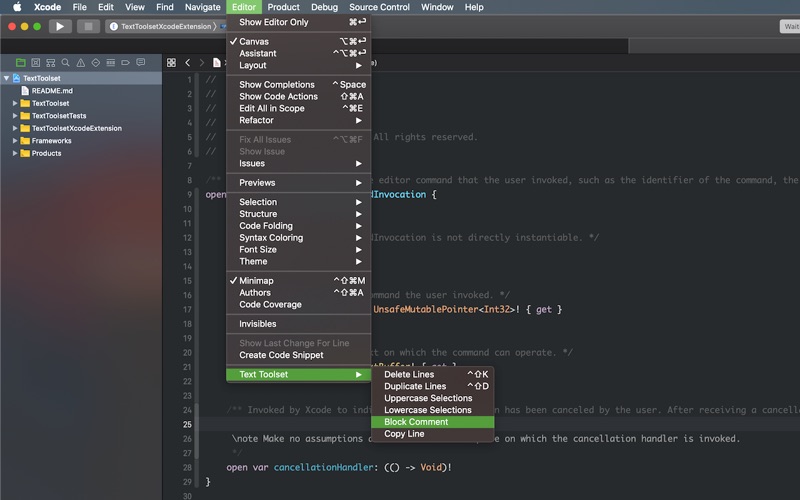
Description
Text Toolset is a free Xcode source editor extension that adds fast, focused text commands to boost everyday editing.
Features added to the editor:
• Add Carets at Start of Selected Lines — Places a caret in front the first character on each selected line
• Toggle Block Comment — Wrap/unwrap selection with /* ... */
• Copy Line — Copy the current line without selecting
• Duplicate Lines — Duplicate the selected lines
• Delete Lines — Delete the current line or selected lines
• Remove Empty Lines — Strip blank lines from the selection
• Uppercase Selection — Convert selections to UPPERCASE
• Lowercase Selection — Convert selections to lowercase
• Prettify JSON — Format selected JSON with indentation
• Compact JSON — Minify selected JSON by removing whitespace
Suggested shortcuts (assign your own in Xcode):
- Toggle Block Comment: cmd+ctrl+/
- Duplicate Lines: ctrl+shift+D
- Delete Lines: ctrl+shift+K
Add your own keyboard shortcuts in Xcode > Settings > Key Bindings. Search for “Text Toolset”.
How to use:
In Xcode, place the cursor in a source editor.
Open Editor > Text Toolset and choose a command.
Enable the extension:
System Settings > Search “Extensions” > Xcode Source Editor and enable Text Toolset.
Compatibility:
- Xcode 15 or later
- Works with Swift, Objective‑C, C/C++, and other text-based files
Soli Deo gloria