Video Editor & Maker -Cup Cute
com.hly.videoCutToolKitIos
View detailed information for Video Editor & Maker -Cup Cute — ratings, download counts, screenshots, pricing and developer details. See integrated SDKs and related technical data.
Total installs
10,000+
Rating
4.6(115 reviews)
Released
February 25, 2021
Last updated
January 7, 2026
Category
Graphics & Design
Developer
立瑗 胡
Developer details
Name
立瑗 胡
E-mail
unknown
Website
http://blog.sina.com.cn/s/blog_bfde2f1e0102zi8t.html
Country
unknown
Address
unknown
iOS SDKs
- No items.
Screenshots



Description
Video editing assistant is a full-format and full-featured video editing software. Compatible with mainstream audio and video formats, and integrates many common functions in the video production process. Set video editing, video format factory, video conversion
Video compression in one video production tool software. Easy to operate, easily edit the video you want, it is a must-have video app for video makers
[Supported audio and video media formats]
•Supported video formats: mp4, mov, mkv, flv, avi, rm, rmvb, 3pg, gif, m4v, mpg, wmv, asf, etc.
• Supported audio formats: mp3, wav, m4a, aac, ape, flac, wma, amr, etc.
[Software Features]
• Full media format support, non-mp4 format video on the computer can also be edited on the mobile phone. TV drama mkv
, Avi and other formats can also be edited directly on the mobile phone, which is convenient and convenient
• Precise video editing, so that a single frame of video can be adjusted
• No video time limit, time is under your control
• Multiple network-wide unique video editing functions to help video editing and production
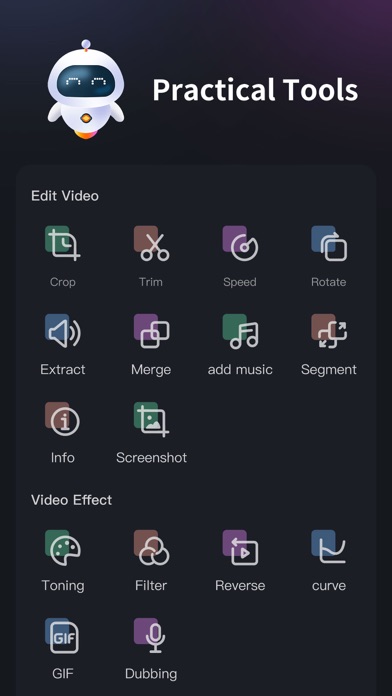
【Function description】
1. Screen cut
2. Time Clip
3. Video speed adjustment
4. Direction rotation
5. Extract audio
6. Merge and merge
7. Replace music
8. Segment cutting
9. Video information
10. Single frame screenshot
11. Video toning
12. Video filters
13. Rewind video
14. Slope speed regulation
15.Video to gif
16. Convert to MP4
17. Video compression
18.Video duplication
19.Image Erase
20.Video Erase
【meidaLeap VIP subscription】
1. Subscribing to VIP members includes the following benefits: HD export, removing advertising and opening all functions.
2. According to your choice, VIP members offer two time period subscriptions: "Monthly Fee" and "Annual Fee”.
3. When purchase confirmed, your iTunes account will be charged.
4. Subscription will automatically renew unless auto-renew is turned off at least 24 hours before the end of the current period
5. Account will be charged for renewal within 24 hours before the end of the current period
6. Subscription can be managed by the user, and can be turned off in user's account settings after purchased. The specific steps are: "Settings"-> "iTunes Store and App Store"-> select "Apple ID" on the iOS device 』-> Click『 View Apple ID 』-> Click『 Subscribe 』-> Select 『meidaLeap 』 on the account settings page to cancel subscription.
Privacy Policy:
https://video-alum.oss-cn-hangzhou.aliyuncs.com/support/meidaLeap_privacyPolicy.html
Terms of Service:
https://video-alum.oss-cn-hangzhou.aliyuncs.com/support/meidaLeap_terms.html
【contact us】
•Official Weibo: http://weibo.com/shipinxiangce
•User exchange qq group: 773291563