Streets - Street View Browser
com.futuretap.streets
View detailed information for Streets - Street View Browser — ratings, download counts, screenshots, pricing and developer details. See integrated SDKs and related technical data.
Total installs
10,000+
Rating
4.7(150 reviews)
Released
April 6, 2016
Last updated
February 28, 2025
Category
Travel
Developer
FutureTap GmbH
Developer details
Name
FutureTap GmbH
E-mail
unknown
Website
https://futuretap.com/appstore/en/streets
Country
unknown
Address
unknown
iOS SDKs
- No items.
Screenshots


Description
Streets is the best way to browse Street View panoramas on iPhone, iPad and Apple Watch.
CONVENIENT
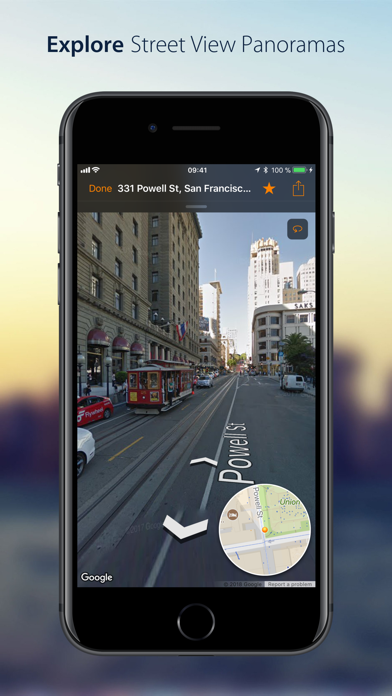
Drop a pin, search for a city or address or find a person from your contacts to view a nearby 360° street panorama. Street View coverage is displayed in blue (for standard panoramas) or orange (for shops and businesses with indoor panoramas). Switch the map to satellite or terrain mode or tilt and rotate the high quality vector map with 3D buildings.
EASY TO USE
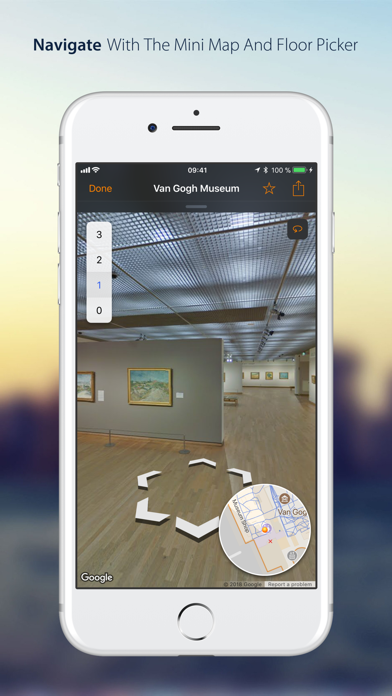
Walking through panoramas has never been easier using the interactive, expandable mini map that also displays your viewing angle and field of view. Virtually traveling abroad is even more immersive and fun with Live Panorama mode: Turn around in the panorama simply by rotating the device.
INTEGRATED WITH OTHER APPS
Streets is the ideal companion to the Maps app. Launch Streets from “Maps” for any location and quickly watch the Street View panorama. On iPad, drag a pin location from the Maps app, a contact, or a textual address into the Streets app to find nearby panoramas. Even geotagged photos can be dropped in Streets to find 360° spherical images near the photo location.
If you’re already using our location finder app Where To?, you’ll also be able to take advantage of tight integration with Streets to view your location and snap right back when you’re done.
COMMUNICATIVE
Share Street View panoramas using drag-and-drop (on iPad) or the share sheet. Handoff and AirDrop let you easily transfer the currently viewed panorama between multiple devices. Mark panoramas as favorites that are automatically synced between devices. Rename favorites and organize them in folders.
2000+ GALLERY PLACES
More than 2000 hand-picked “Gallery Places” show spectacular places such as museums, castles, national parks, ski slopes and even underwater attractions. Geysers in Yellowstone national park, old masterpieces in Amsterdam’s van Gogh museum or NASA’s rocket launch pad in Cape Kennedy are just a few of the breathtaking places waiting to be explored. Gallery places also include background information such as descriptions and links.
Apple Watch App
Streets is the only app capable of displaying 360° Street View panoramas on the Apple Watch. The digital crown is utilized to turn around in panoramas. Streets for Apple Watch automatically syncs favorites and recent searches with your iPhone.
FEATURES
- Supports iPad Pro, Split View and Slide Over
- Supports keyboard navigation (with Bluetooth or Smart Keyboard)
- Mark panoramas as favorites that are automatically synced between all your iOS devices
- Rename favorites and organize them in folders
- Share Panoramas via email, message, or social networks
- Spotlight search also finds Streets panoramas
- Handoff lets you easily transfer the currently viewed panorama from iPhone to iPad or vice versa
- Siri can create reminders with a link to the currently displayed panorama
- Create workflows to grab and process panoramas for specified contacts or other locations
WHAT OTHERS SAY
“I highly recommend Streets 3.“
- John Voorhees, MacStories
“it’s hard to imagine Cupertino doing it better than Streets 3”
4.5/5 mice
- J.R. Bookwalter, Macworld
“If you haven't migrated to Google Maps on iOS because you're OK with Apple Maps but you miss Google Street View, here's a pretty easy solution.“
- Mel Martin, Engadget
“Thankfully, with Streets, you can continue using Maps and still be able to quickly pull up Street View without ever feeling like you’ve left the app.“
- Jordan Khan, 9to5Mac
SOCIAL MEDIA
Get to know the latest updates and news from our development lab:
- Mastodon: https://urbanists.social/@streets
- Facebook: http://fb.com/streetviewapp
- X: @futuretap
Streets Terms of Service: https://www.futuretap.com/streets-terms