Func Button for Mi Band 2
xtracer.miband2funcbutton
View detailed information for Func Button for Mi Band 2 — ratings, download counts, screenshots, pricing and developer details. See integrated SDKs and related technical data.
Total installs
763.2K(763,285)
Rating
3.5(14 reviews)
Released
August 13, 2016
Last updated
March 6, 2019
Category
Health & Fitness
Developer
BLACKNOTE
Developer details
Name
BLACKNOTE
E-mail
xtracerl@gmail.com
Website
unknown
Country
Russia
Address
455000, Russian Federation, Magnitogorsk, Korobova street 16/1 37

Screenshots


Description
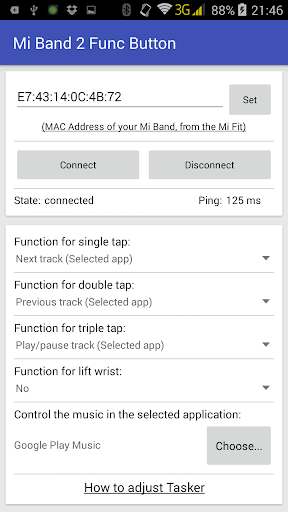
It allows you to configure a function on a single, double and triple tap of the button. Also you could set a function on a gesture of your wrist rotation.
The following options are available at the moment:
* Ability to play, stop, switch to the next/previous music track for the most famous music players.
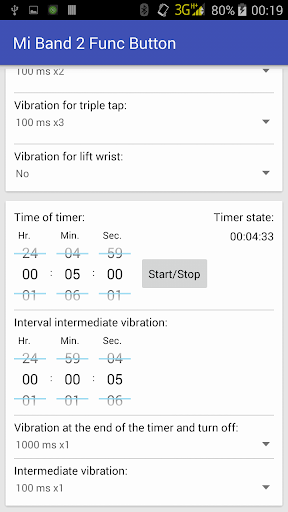
* Set a timer. You could also set a time interval for an intermediate vibration.
* Sending commands to Tasker
* Hang up, mute and answer a call.
* Activate vibration on the phone.
* Start the alarm sound on the phone.
* Adjust the volume level.
For every kind of tap, you could configure a response in the form of a vibration.
FULL version disables the limit on the number of taps.
If the program does not see the purchase, then restart the phone.
WARNING! Mi Band 3 is supports the old method, but it can only detect one press and only when the screen of band is off!
If you lose connection:
It is necessary to turn off the power saving of the phone.
Fix the program in memory so that it does not unload.
Allow the program to work in the background.
Pair a bracelet in the Bluetooth system settings.
Add the program to autoload.