SnapTik Pro: HD TT Downloader
snaptikpro.allvideo.downloader.nowatermark.tiktok
View detailed information for SnapTik Pro: HD TT Downloader — ratings, download counts, screenshots, pricing and developer details. See integrated SDKs and related technical data.

Screenshots



Description
🌟 Or do you need a simple and easy-to-use tool to download videos with No watermark from all your favorite platforms like FB, IG, or TwiT? 🔄
☑️ Let's Install SnapTik now - our easy-to-use tool that helps you achieve your goals easily! Supports video, music, and photo downloads from TT, FB, IG, TwiT, and of course, TIk - all without watermarks, so you can edit, repost, or enjoy them offline whenever you want!
Download any of your favorite videos without having to log in!
Outstanding Features of SnapTik Pro:
🌐 Supports Multiple Platforms: Seamlessly download videos from Facebook, Instagram, TikTok, and TwiT.
🚫 No Watermarks: Enjoy videos offline or edit them without any distractions.
📂 Supports Various Video Formats: Download videos in 4K, HD, and standard quality.
⏳ Batch Download: Save time by downloading multiple videos at once.
📥 Offline Viewing: Watch HD videos offline with ease.
⭐️ Convenient Video Management: Manage your downloaded videos easily.
⭐️ Share Anytime: Share videos on social media apps or with friends.
🧭 User-Friendly Interface: Fast, safe, and easy to navigate.
🔄 Regular Updates: Benefit from ongoing improvements and new features.
🔓 How to Use SnapTik:
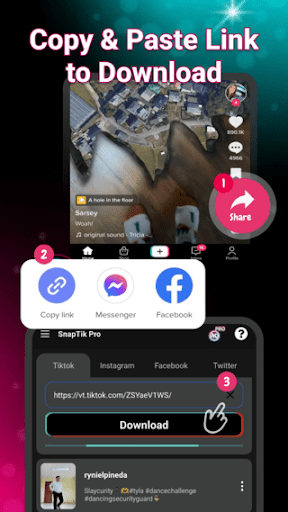
Step 1: Open the SnapTik Pro app.
Step 2: Copy the video link from TT, FB, IG, or TwiT/X.
Step 3: Paste the link in the app, and it will auto-download the video without watermarks. You can also select to download music.
🎉 Done! Your favorite videos are now ready for enjoyment anywhere!
🔓 How to Use the Batch Download Feature:
Step 1: Open the SnapTik Pro app.
Step 2: Go to the main screen and tap "Batch Download."
Step 3: Select the videos you want to download and tap "Download."
Disclaimer:
Disclaimer: SnapTik is a video download support tool and is not affiliated with any other companies. We respect intellectual property rights and encourage users to obtain permission before downloading or sharing videos. Users are responsible for any copyright infringement. ❤️ Thank you for choosing SnapTik Pro, a high-quality, watermark-free HD video downloader app. For feedback, contact us at SnapTikPro@gmail.com.
⭐⭐⭐⭐⭐ If SnapTik Pro: HD TT Downloader has been helpful, please consider rating us 5 stars to support the developer!
Thank you very much for using SnapTik Pro: HD TT Downloader.