Colorful Budget
se.adanware.colorfulbudget
View detailed information for Colorful Budget — ratings, download counts, screenshots, pricing and developer details. See integrated SDKs and related technical data.

Screenshots


Description
Simple and minimalistic budget planner / money tracker.
Keep track of all incomes and expenses or just check how much money you spend on your hobbies or bad habits!
Create your own categories in your own color.
Currency displayed depends on your local settings or can be changed to whatever you feel like!
Transaction view lets you add all your expenses and incomes in a easy to see list for each month. Long-press an item to edit, remove or duplicate.
All budgets and transactions is calculated in a time period.
The period can be set to weekly, biweekly, monthly and yearly.
Examples:
Salary comes on the 25th, select a monthly time period with a custom start date and each period will run from 25th to the 24th next month.
Weekly and biweekly can be set to start on the weekday of your choosing.
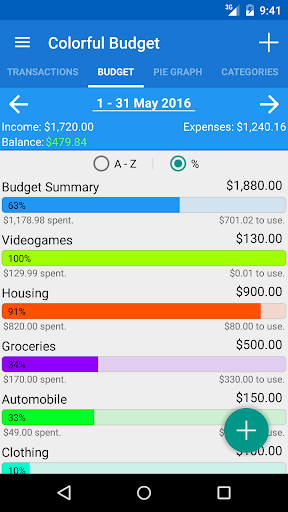
Budget View brings your monthly budget in a easy to see perspective. See how much you've spent and what you have left according to your period limit and Budget Category.
Recurrent bills ?
Navigate to 'Bills', you can store all bills that stay the same every month, just check 'em and choose a date to insert them to!
Export your expenses / incomes to the CSV fileformat.
- Export to SD-Card or to Google Drive
- Sort them by date or by category.
- Export everything or by a date interval.
- Easily import them on your computer or on another phone, a preview will show up with the parsed items, it'll also warn you if you have the exact same item on the same date.
Reports ?
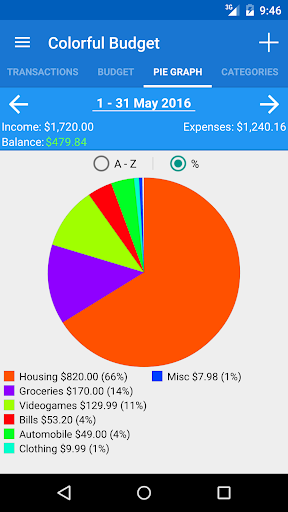
Every month you can view a circle graph to see where you've spent your money or you can go to 'Reports' to see your annual expenses. You can also filter your transactions based on date or category.
Sync your data between your devices through Bluetooth!
Now have fun planning and following your finance!