Scientific Calculator Scalar
org.mathparser.scalar.lite
View detailed information for Scientific Calculator Scalar — ratings, download counts, screenshots, pricing and developer details. See integrated SDKs and related technical data.

Screenshots


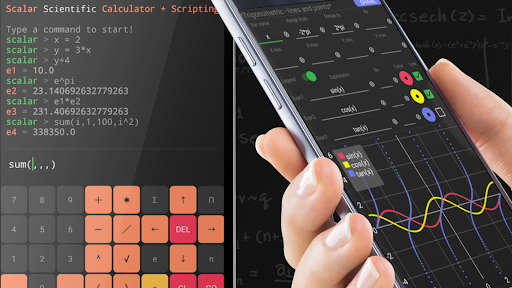
Description
📗📙📘 Click and see the user guide in PDF
🥇 Extremely Flexible & Very Advanced Scientific Calculator with User Arguments Definition, User Functions Definition, Functions Graphs, Scripts Programming and many other features.
Scalar is much more than a calculator. Scalar is a powerful math engine and math scripting language, that combines the simplicity of standard calculators with the flexibility of scripting. Thanks to Scalar, defining arguments and functions, as well as using them in subsequent calculations, expressions and functions graphs, has never been easier. You will see it shortly after getting familiar with available screens and options.
🎯 Main features:
🔹 Standard & Advanced Scientific Calculator
🔹 Extremely convenient calculator keyboard
🔹 Re-usage of previous calculations, just reference a constant that was created for your convenience
🔹 User defined arguments, as simple as x = 2
🔹 User defined functions, as simple as f(x) = x^2, f(x,y,…)=2*x+y
🔹 User defined random variables, as simple as rand X = rNor(0,1)+1
🔹 Beautiful function graphs, set variables, range, expression, interact with the chart!
🔹 Scripts writing, personalize and automate you work!
🔹 Rich set of examples built-in in the app!
🔹 Work saving and results sharing
👌 The definition of user elements has never been easier!
Using Scalar you can easily create user elements, below are examples of the natural mathematical syntax:
▶ scalar > x = 2
▶ scalar > y = 2 * x
▶ scalar > y
➥ e1 = 4.0
▶ scalar > x = 3
▶ scalar > y
➥ e2 = 6.0
👌 There is no need to save the results!
In Scalar, each result is assigned to an automatically created constant, see example:
▶ scalar > 2 + 3
➥ e1 = 5.0
▶ scalar > 4 + 6
➥ e2 = 10.0
▶ scalar > e1 + e2
✪ ➥ e3 = 15.0
👌 User functions give huge possibilities of personalization!
Defining user functions is just as simple as writing a formula
▶ scalar > f (x, y) = sqrt (x ^ 2 + y ^ 2)
▶ scalar > f (3,4)
➥ e1 = 5.0
👩🏫 Scalar was created by a mathematician, therefore it has built-in summation and product operators!
Scalar also supports summation and product operators, for example the number of prime numbers in the range of 2 to 1000
▶ scalar > sum ( i, 2, 10000, ispr (i) )
➥ e1 = 1229.0
⚡️ This is only a tiny part of available options!
It is only a presentation of a small part of the available mathematical functions. All implemented math elements exceeds several hundred.
👩🏻💻 At Scalar, you can write scripts!
🔹 The ability to write scripts is a unique feature among scientific calculators.
🔹 We all know how scripts significantly accelerate work.
🔹 Scalar provides a nice script editor with syntax highlighting & syntax hints.
🔹 Scripts can be saved and/or shared (pro version).
🔹 Start-up script is also supported (pro version).
📈 At Scalar you can create beautiful function graphs!
🔹 Visualization is important - no doubts!
🔹 Scalar provides the ability to create highly personalized function charts.
🔹 Functions graphs are fully interactive: values reading, scaling, zooming.
🔹 Function charts can be saved or shared (pro version).
🏆 Free version vs paid version:
You can take full advantage of the free version of Scalar, however some options will be unavailable. These are mainly the ability to save / open a script, save / open a chart, share calculations, share scripts and share charts. All these options can be found in the pro version.
📳 ScalarMath.org
More details on: ScalarMath.org
👌 Enjoy using Scalar Scientific Calculator!