NZHL Mobile Banking
nz.co.nzhomeloans.mobile
View detailed information for NZHL Mobile Banking — ratings, download counts, screenshots, pricing and developer details. See integrated SDKs and related technical data.
Total installs
32.2K(32,276)
Rating
unknown
Released
July 26, 2013
Last updated
September 24, 2025
Category
Finance
Developer
Kiwibank Ltd.
Developer details
Name
Kiwibank Ltd.
E-mail
mobileappsfeedback@kiwibank.co.nz
Website
unknown
Country
unknown
Address
unknown

Screenshots


Description
NZHL - About this app
Welcome to your closest branch. Get it done online, no matter where you are, with the NZHL mobile app. This is banking at your fingertips.
STAY ON TOP OF YOUR FINANCES
• View account balances and search your transaction history
• Set up Quick Balances and add widgets to your home screen, or on your Wear OS watch, to get your balances at a glance without having to login.
• Pay your bills or transfer money to family, friends and others
• Manage your payees
• Pay tax directly to IRD
• You can refix your home loan or switch to a variable rate when it's up for renewal
MANAGE YOUR ACCOUNT
• Change or reset your password
• Update your KeepSafe questions
• Update your contact and tax details
• Send a message using SecureMail
• Personalise your accounts with your favourite photos.
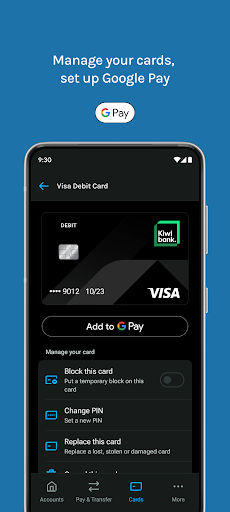
MANAGE YOUR CARDS
• Set up Google Pay and pay with your phone anywhere contactless is accepted
• Set or change a PIN on your cards
• Block or unblock your cards
• Replace your lost, stolen and damaged cards
• Cancel your EFTPOS and Visa Debit Cards
APPLY OR OPEN
• Order an EFTPOS or Visa Debit Card
SECURE BANKING
• It’s safe, secure, and backed by our internet banking guarantee
• Securely access your account with a PIN code or biometric with Touch ID on supported devices or
• Log in with your Internet Banking password
• KeepSafe and two factor authentication provide an extra layer of security
GET STARTED
Our mobile app is free to download and easy to set up, you just need to be a NZHL customer.
If you need more information about setting up or using our mobile app, you’ll find answers to frequently asked questions here - https://www.kiwibank.co.nz/contact-us/support-hub/mobile-app/common-questions/
Please let us know what you think about the NZHL Mobile Banking app under the Contact Us menu in the app.