TAI Clock and Converter
nl.tvoverbeek.taiclock
View detailed information for TAI Clock and Converter — ratings, download counts, screenshots, pricing and developer details. See integrated SDKs and related technical data.

Screenshots

Description
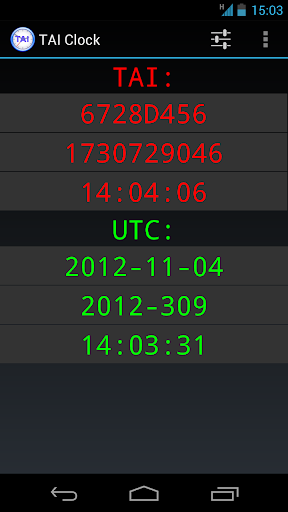
Show both/Converts between TAI (International Atomic Time) and UTC (Coordinated Universal Time aka GMT).
TAI is shown in 3 buttons as a 32 bit integer in seconds in both hexadecimal and decimal and as HH:MM:SS.
UTC is shown in 3 buttons:
- YYYY-MM-DD (year, month, day)
- YYYY-DDD (year, dayofyear (0-365/366)
- HH:MM:SS (hour, minute, second)
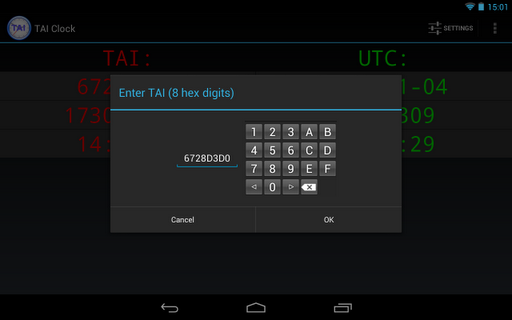
Tapping any button stops the running clock and allows you to edit it and show the corresponding time in the other representations.
A long press on either one of the TAI buttons or the UTC HH:MM:SS button starts the corresponding full screen clock. There is a setting to keep the screen on while displaying a full screen clock.
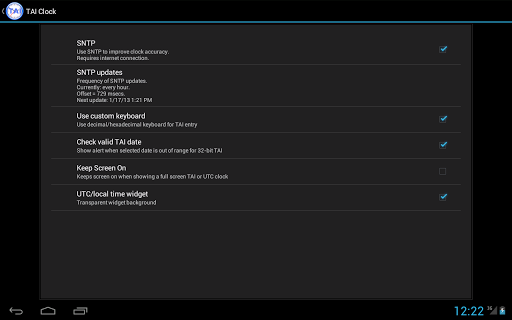
The running clock uses the system clock. The accuracy of the clock can optionally be improved by synchronizing with an internet time server using the SNTP protocol. The frequency of the updates can be set to Never, Once, Every 10 minutes, Every hour and Every 6 hours. Obviously this requires a working internet connection. SNTP updates are only active when the app is in the foreground.
Home screen widgets and a lock screen widget are also included.
Widgets are resizable for Android >= 4.1.