ねこアラーム 祝日・休日対応(目覚まし時計)
net.softyasu.nekoalarm
View detailed information for ねこアラーム 祝日・休日対応(目覚まし時計) — ratings, download counts, screenshots, pricing and developer details. See integrated SDKs and related technical data.
Screenshots


Description
[Alarm Clock]
A free cat-themed alarm clock.
Includes a "Message of the Day" feature that changes with the season and events!
New Feature: Support for holidays, weekends, and scheduled dates.
*Fully compatible with Android 15.
*Tested on Android 16 Beta!
[Cats] Everything from the background and image to the icon, alarm sound, and alarm time is cat-themed.
[Holiday Support] You can now choose whether or not to have the alarm ring on holidays and scheduled dates.
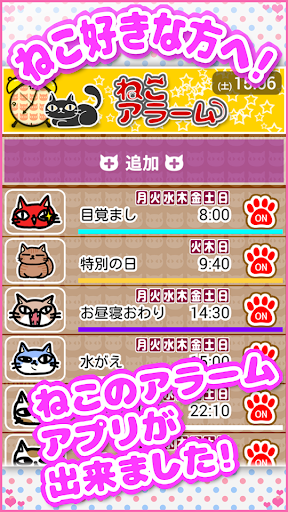
[Easy] Easily register and manage multiple alarms. Icons and titles make it easy to tell which alarm is which!
[Features] Set alarms for holidays, events, days of the week, and specific times. You can also choose whether or not to vibrate. You can even use your favorite songs from your smartphone as your alarm sound. Of course, there's also a snooze function.
[Fun] Enjoy a message of the day after the alarm rings.
[Fun 2] The picture and message of the day change with the seasons. There are also event elements for Christmas, New Year's, Valentine's Day, and more.
[Caution!] The alarm may not function properly due to your smartphone's energy-saving features, power-saving apps, task killer apps, etc. If you use these apps, please register "Cat Alarm" as an unrestricted app. Thank you for your understanding.
[Review] Reviewed by Appliv.
https://app-liv.jp/2594370/
[Review] Reviewed by "dMarket App & Review Editorial Department." http://app.dcm-gate.com/app_review/00f1714/
[Review] Reviewed by [Everyday is an Appliday]. https://news.mynavi.jp/article/20200706-1096554/
[Thank you!!]
August 27, 2017: Reached 100,000 downloads!!
.
[Required Permissions]
● Image/Media/File Access Permissions: Used to select your alarm sound from your favorite music, etc.
● Draw over other apps Permission: This permission is required to display the alarm screen at any time on Android 10 and later. If you only need notifications while using other apps, you do not need to enable this permission.
● Phone Permissions: "Phone Permissions" are separate from "Phonebook (Contacts) Permissions" and are permissions for making and receiving phone calls, but do not access personal information. On Android 11 and later, this permission is required for "Cat Alarm" to know whether you are currently on a call. If permission is denied, the alarm will sound even during a call.
If you are concerned about enabling permissions, some restrictions will be placed on their operation, but "Cat Alarm" can still be used even if you deny the permission.