Useful Zoom V-Player
net.katapu.zoomablevideoplayer
View detailed information for Useful Zoom V-Player — ratings, download counts, screenshots, pricing and developer details. See integrated SDKs and related technical data.

Screenshots

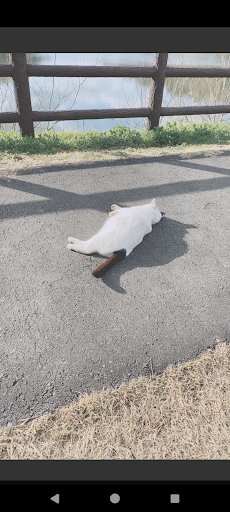
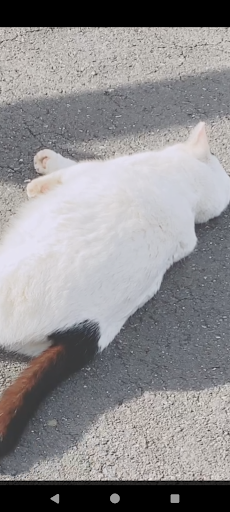
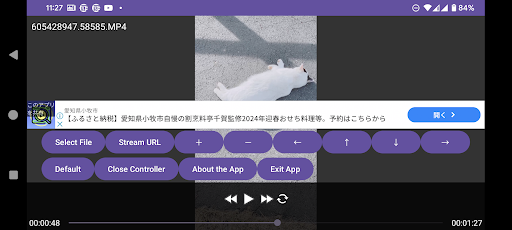
Description
A convenient video player that can easily zoom in and out has been introduced! Have you ever wanted to magnify a part of a video while playing it? This player is designed to perform screen magnification operations as standard, without requiring complicated actions. Although it might not be used frequently, it's definitely handy when needed.
※This app does not have a login authentication feature and does not provide video content. Please select a video file from your device via the file selector to play it, or select a video file using a file manager (separate app) and play it with this app.
The video playback engine uses the reputable LibVLC, so it can also be used as a regular video player. It's free, so feel free to use it.
[Operation Instructions]
○ Touch Control
When controller is hidden: Move screen: Swipe
Select execution: Single tap
Zoom in/out: Two-finger gesture.
Play/Pause: Tap play/pause button on the controller
Fast forward: Tap fast forward button on the controller
Rewind: Tap rewind button on the controller
Show controller: Single tap the screen (when controller is hidden)
Hide controller: Single tap an empty area of the screen (when controller is visible)
Zoom in: Double tap
Zoom out: Long press
Exit (when controller is hidden) | Hide controller (when visible): Tap the "BACK" button
○ Remote Control
When controller is hidden: Move screen | When controller is visible: Directional control: [Directional buttons]
Show controller (single press)/Zoom in (double press)/Zoom out (long press) | When controller is visible: Execute selection: ["CENTER" button]
Play/Pause: ["MEDIA_PLAY_PAUSE" button]
Play: ["MEDIA_PLAY" button]
Pause: ["MEDIA_PAUSE" key] ["MEDIA_STOP" key]
Fast forward: ["MEDIA_FAST_FORWARD" button] ["MEDIA_SKIP_FORWARD" button] ["MEDIA_STEP_FORWARD" button]
Rewind: ["MEDIA_SKIP_BACKWARD" button] ["MEDIA_STEP_BACKWARD" button]
Show controller: (when hidden) ["CENTER" button]
Hide controller: (when visible) ["BACK" button]
Zoom in: Double press ["CENTER" button]
Zoom out: Long press ["CENTER" button]
Exit (when controller is hidden) | Hide controller (when visible): ["BACK" button]
○ Gamepad Control
When controller is hidden: Move screen | When controller is visible: Directional control: [Cursor buttons]
Show controller (single press)/Zoom in (double press)/Zoom out (long press) | When controller is visible: Execute selection: ["A" button]
Play/Pause: ["START" button] ["SELECT" button]
Fast forward: ["R1" button]
Rewind: ["L1" button]
Show controller: ["L2" button]
Hide controller: ["R2" button]
Zoom in: ["X" button]
Zoom out: ["Y" button]
Exit (when controller is hidden) | Hide controller (when visible): ["B" button]
○ Hard Key Control
When controller is hidden: Move screen | When controller is visible: Directional control: [Cursor keys] / Up ["E" key] ["8" key] / Down ["C" key] ["2" key] / Left ["S" key] ["4" key] / Right ["F" key] ["6" key]
Show controller (single press)/Zoom in (double press)/Zoom out (long press) | When controller is visible: Execute selection: ["ENTER" key] ["SPACE" key] ["D" key] ["5" key]
Play/Pause: ["R" key] ["0" key]
Play: ["T" key]
Pause: ["G" key]
Fast forward: ["V" key] ["3" key]
Rewind: ["X" key] ["1" key]
Show controller: ["Q" key] ["/" key] ["#" key]
Hide controller: ["W" key] ["*" key]
Zoom in: ["A" key] ["+" key] ["9" key]
Zoom out: ["Z" key] ["-" key] ["7" key]
Exit (when controller is hidden) | Hide controller (when visible): ["ESCAPE" key] ["." key]