PoGO RAID - Join Remote Raids
net.gishan.pokemongo.pokemon
View detailed information for PoGO RAID - Join Remote Raids — ratings, download counts, screenshots, pricing and developer details. See integrated SDKs and related technical data.
- No items.

Screenshots
Description
PoGO RAID (formerly known as Raid KING app) is a key to the most trusted and well established online network of trainers battling in remote Raids!
Get to know trainers around the world, join and host remote Raids together conveniently. Use dedicated real-time chat room for each coordinated Raid to better plan your strategy.
How to join a remote Raid?
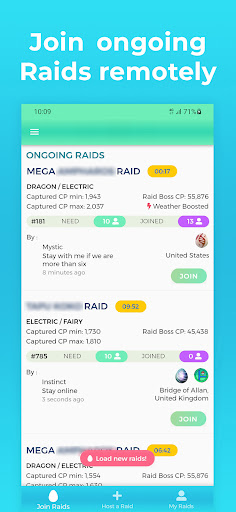
- App will beep once when new Raids are added, click Load new Raids popup to load the latest vacant Raids.
- Join any remote Raid listed in the Raids tab.
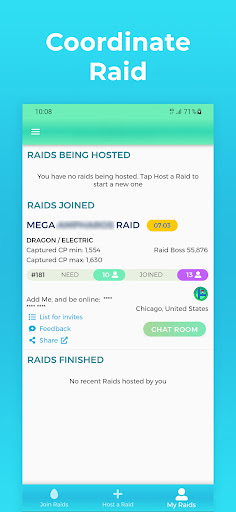
- After joining, add the friend code shown (click Copy Code button to copy the code that can be conveniently pasted in the game), or use camera to scan the QR code to add the host trainer as a friend in game.
- Click Chat Room button to join the dedicated chat room for the Raid.
- Discuss and follow the instructions from the host trainer in the chat room on battling in the Raid.
- Provide feedback to the host trainer.
How to host a remote Raid?
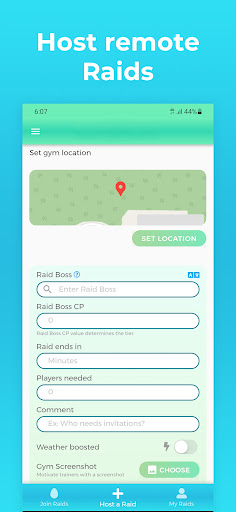
- Click Host a Raid tab of the app.
- Enter the Raid Boss name, CP, time left, number of trainers required for the battle and the gym location. Alternatively you may add a screenshot of the gym which will be published both on website and on the app for improved trustworthiness (optional).
- Join the chat room and wait for the required number of trainers to join.
- Click List button to get a list of trainers who would like to join your raid. Wait for the trainers to send friend requests to you.
- In the List page click Copy List button to copy all trainers who joined the list.
- Accept all friend requests in the game.
- Join the Raid from the game and in invites screen paste the copied List and add trainers to your raid conveniently!
*To join and host Raids remotely a remote raid pass is required in game.
This version has:
- No subscriptions
- No push notifications
- Improved performance for low bandwidth connections
- Light weight download (~10 MB)
- Sign in with Gishan Networks account