appwisp
  • App explorer
  • SDKs insights
  • API
  • Contact
  • About
  • API
  • Github
Ā© 2025 appwisp.com

File Miner: Photo Recovery

net.fileminer.android

View detailed information for File Miner: Photo Recovery — ratings, download counts, screenshots, pricing and developer details. See integrated SDKs and related technical data.

Total installs
45.8M(45,829,493)
Rating
4.1(384 reviews)
Released
June 15, 2022
Last updated
January 21, 2026
Category
Productivity
Developer
Cheryl Cook
Developer details

Name
Cheryl Cook
E-mail
williamsrm756316@gmail.com
Website
unknown
Country
unknown
Address
unknown
Android SDKs

  • Adjust
  • Android SDK
  • Facebook Audience Network
  • Google AdMob
  • Google Firebase
File Miner: Photo Recovery Header - AppWisp.com

Screenshots

File Miner: Photo Recovery Screenshot 1 - AppWisp.com
File Miner: Photo Recovery Screenshot 2 - AppWisp.com
File Miner: Photo Recovery Screenshot 3 - AppWisp.com
File Miner: Photo Recovery Screenshot 4 - AppWisp.com

Description

Did you accidentally delete important photos or videos? 😱
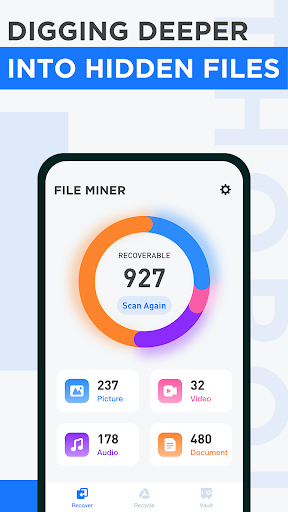
Don't panic! File Miner is your ultimate professional file recovery tool. It acts as a powerful recycle bin on your phone, helping you dig deep to undelete photos, restore videos, and retrieve lost documents instantly.

No root required! Simply download File Miner and let our advanced scanning algorithm read your internal storage to find what you lost.

🌟 Why Choose File Miner?

šŸ” Powerful Deep Scan Technology
File Miner doesn't just look at the surface. It scans hidden folders, cache directories, and temp files where your "deleted" memories are often still hiding.

Recover Deleted Photos: Restore JPG, PNG, and other image formats.
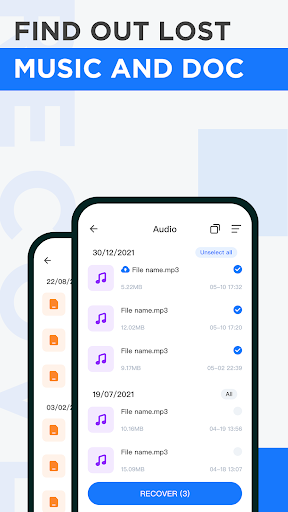
Video & Audio Recovery: Retrieve MP4, AVI, and voice recordings you thought were gone forever.
Document Rescue: Accidentally deleted a work file? We support PDF, Word, Excel, and more.
šŸ›”ļø Safe & Private Preview
We ensure your data safety. Before you recover, you can:

Preview scanned images and videos to make sure they are the right ones.
Select only what you need to restore, keeping your storage clean.
šŸ“‚ Secure File Vault
More than just a recovery tool, File Miner offers a private space for your sensitive data.

Move your important files into the File Vault.
Prevent them from being strictly deleted or accessed by other apps.
šŸš€ Key Features at a Glance:

⚔ Fast Scan: Quickly find recently deleted files.
šŸ¤– Smart Recognition: Automatically categorize files by format (Photo, Video, Audio, Doc).
šŸ“¤ Export Capability: Save recovered files to a public folder for easy access.
āŒ No Root Needed: Works on most Android devices without complex access permissions.
How to use?

Open File Miner.
Choose the file type (Photo/Video/Audio).
Wait for the Deep Scan to finish.
Select the files you want and tap "Recover".
Download File Miner now and never worry about losing your precious memories again! It's the smart way to safeguard and restore your Android data.