A41 WatchFace for Android Wear
net.ddroid.aw.watchface.a41
View detailed information for A41 WatchFace for Android Wear — ratings, download counts, screenshots, pricing and developer details. See integrated SDKs and related technical data.
- No items.
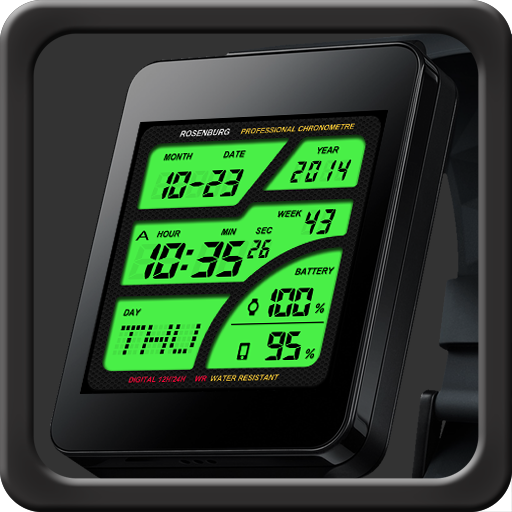
Screenshots


Description
Custom watch face for Rectangle Android Wear
Features
- Awesome designer's watch face for you.
- Allow you to edit LED color
- show wear's battery level (0%-100%)
- show mobile phone's battery level (0%-100%)
More watch faces
- Visit our exclusive watchface collections for Android Wear on the Play Store
http://goo.gl/58kqxS
For Android 6.0(and higher) phone users
Need to do following setup procedure after installation.
http://androidwearface.com/for_android6_users/
Installation
It will be installed on your watch automatically from your phone paired with your watch after a short time and please wait.
After installation,you can choose the watch face from the setting menu.
Or just long tap on the current watch face screen,so watch face selector screen will open.
Support 12Hours/Military time format
You can choose between three types of time format.
- 12Hours ex. '08:35' with AM/PM
- 12Hours ex. '8:35' with AM/PM (No zero in front of times)
- 24Hours(military time)
Settings:Support color mode changing
- Auto switch Color mode and Black-and-White mode (when dimmed)
- Always Black and White mode
Settings:Support Black-and-White mode's color change
- You can select Black-and-White mode color from among seven colors.
Select 'Color filter at the time of the Black-and-White mode' on the setup screen.
* Tap the watchface icon on your PHONE to setup.
Please note
- If you don't like this model please cancel your order in 15 minutes. And try another watch face.
*Smartphone and Android Wear must be paired before you use it.
[NOTICE]
If you have a question,plsease contact our email address in English.