유안타증권 MY SMART t
mysmarttnew.android
View detailed information for 유안타증권 MY SMART t — ratings, download counts, screenshots, pricing and developer details. See integrated SDKs and related technical data.

Screenshots

Description
[Service provided]
1. MY tRadar: Recommend stocks carefully selected through a verified analysis algorithm
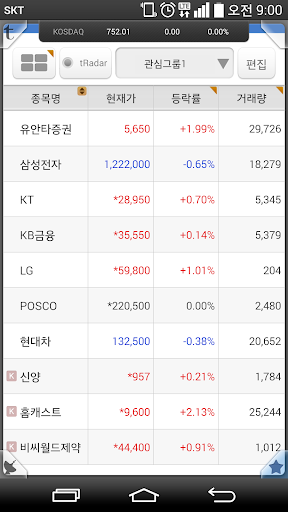
2. Interests: list/block mode, holding group, tRadar linkage
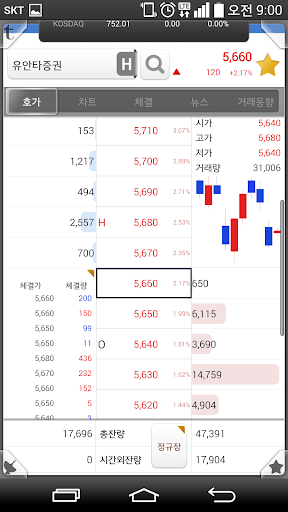
3. Current price: Ask price. Charts, executions, news, trading trends
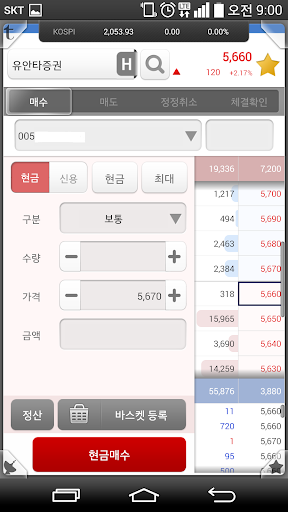
4. Order: Stock order (cash/credit), order basket, order-only keypad
5. Execution status board: Identify the current order execution status at a glance only with the color of the status board at the top right
6. Banking: transfer, asset status, transaction details
7. tRadar Alert: Real-time update of investment information such as tRadar signal capture
8. Enlarged view: Larger view of essential screens such as items of interest, current prices, and orders
[Main Features]
* Equipped with MY tRadar, an artificial intelligence stock recommendation system
* Innovative UI/UX that allows you to easily process prices and orders with just one tap
* Differentiated services for trading such as reminders, redemption boards, order baskets, and order-only keypads
* Enhanced personalization functions from button positions to charts
* Larger view function for users who are worried about the small screen of their smartphone
[Access Rights Details]
* Required access rights
- Phone: Permissions required for tasks such as mobile phone authentication, device information confirmation, and customer support center calling service (mobile phone number and terminal device ID)
- Storage space: Permissions required for event information, screen files, environment settings, etc.
- Installed apps: To prevent electronic financial transaction accidents, only the items that may be a threat among the apps installed on the device are collected.