KX3Mate
jp.makonao.kx3mate
View detailed information for KX3Mate — ratings, download counts, screenshots, pricing and developer details. See integrated SDKs and related technical data.
- No items.
Screenshots
Description
This is a small controller for the Elecraft KX3.
This is a beta version.
KX3Mate is an application for controlling the Elecraft KX3, a US amateur radio transceiver. To use it, connect the KXUSB included with the KX3 to an Android device that supports USB On-To-Go (USB OTG) via an OTG USB cable and launch KX3Mate.
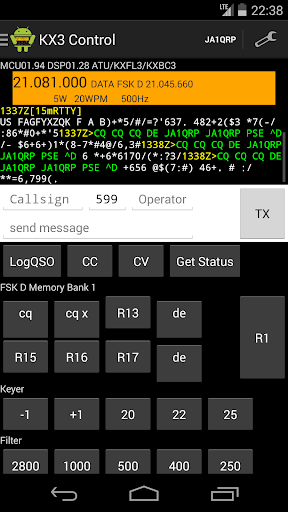
The KX3Mate and KX3 enable easy CW and RTTY/PSK operation, and in digital mode, decoded data can be displayed and logged. Pre-edited messages for each mode can be sent with a single touch. There are also macro buttons that can be freely configured, as well as buttons with pre-set macros for functions requiring multiple actions, which can be recalled with a single touch. Numerous button visibility settings, including button presets, are customizable.
* Features
** Display
- Displays the KX3's VFO and mode information.
- Displays the transmission time in color to distinguish transmitted messages.
** CW/RTTY/PSK Message Transmission:
- Send any message you like.
- Specify callsign, RST, user information, etc. using message macros.
- Press and hold the TX button to erase the message.
** CW/RTTY/PSK Memory Message Transmission:
- Send memory messages in CW/RTTY/PSK modes.
- Up to 8 messages can be saved per mode, divided into 4 banks, for a total of 32 messages.
- Message macros can be used to specify callsign, RST, user information, etc.
** KX3 Built-in Message Transmission:
- Transmits KX3 built-in messages MSG1 to MSG6.
** Macro Transmission:
- Transmits KX3 macros.
- Up to 8 macros can be saved in 4 banks, for a total of 32 macros.
** Keyer:
- Preset the keyer speed (3 types) and recall them with a button.
- Use the increase/decrease buttons to change the frequency in 1 WPM increments.
** Filter:
- Preset five filter bands and recall them with the button.
** Transmit Power:
- Preset five transmit power levels and recall them with the button.
** VFO:
- Switch between VFO A/B and increase/decrease the frequency.
** Memory Channel:
- Recall the KX3's built-in quick memory and memory channel with the button.
** Mode, Band:
- Recall the mode or band with the button.
- The mode and band buttons can be mapped in the settings.
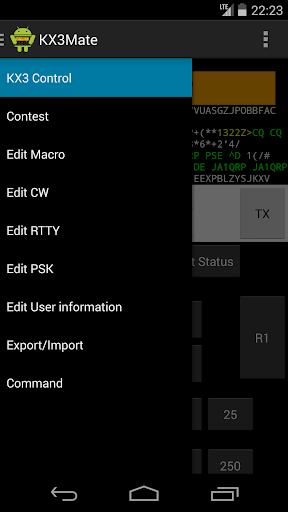
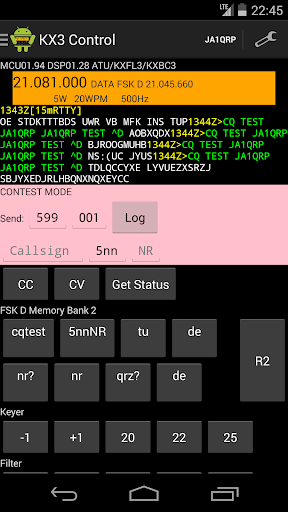
** Contest:
- Enables contest operation.
- The contest number can be set to RST+001 or a fixed number.
- Outputs a Cabrillo-format log.
** QSO Log:
- Saves callsign, RST, mode, frequency, OP, etc. to the storage.
Text log save location: /Download/KX3Mate/kx3_qso_CALLSIGN.txt
ADIF log save location: /Download/KX3Mate/kx3_qso_CALLSIGN.adi
Cabrillo log save location: /Download/KX3Mate/kx3_cab_CALLSIGN.txt
** Automatic decode log:
- Automatically saves decoded text to storage.
Save location: /Download/KX3Mate/decode_YYYYMMDD.txt
** Macro/memory and user data file export/load:
- Macro/memory data can be exported to/loaded from storage.
Save location: /Download/KX3Mate/kx3matemacro.dat
- User data can be exported to/loaded from storage.
Save location: /Download/KX3Mate/kx3mateuser.dat
** Settings:
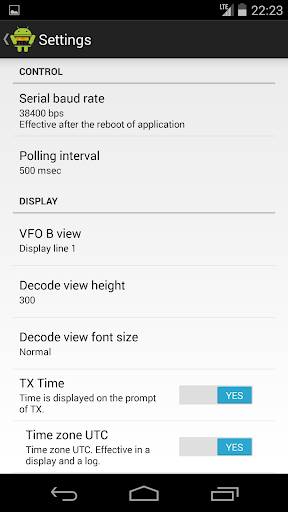
- You can set the display/hide and format of the send time.
- You can set the display interval for text decoding.
- You can set the display/hide of buttons.
- You can also set various other settings.
* Limitations
- The application may crash when plugging or unplugging the USB cable.
- The application may crash when switching screens.
- The application may crash when closing.
* App Permissions
This app requires the following permissions:
- Modify or delete the contents of USB storage
- Read USB storage
* System Requirements
** Software:
- Android version 6.0 or later
** Hardware:
- An Android device that supports USB On-To-Go (USB OTG)
- USB cable (micro USB to USB A connector)
- Elecraft KX3
- Elecraft KXUSB