FlashAir
jp.co.toshiba.android.FlashAir
View detailed information for FlashAir — ratings, download counts, screenshots, pricing and developer details. See integrated SDKs and related technical data.
Total installs
1.8M(1,835,346)
Rating
2.5(191 reviews)
Released
August 27, 2012
Last updated
January 1, 1970
Category
Photography
Developer
KIOXIA Corporation
Developer details
Name
KIOXIA Corporation
E-mail
ytc-MemoryApp@kioxia.com
Website
unknown
Country
unknown
Address
unknown

Screenshots


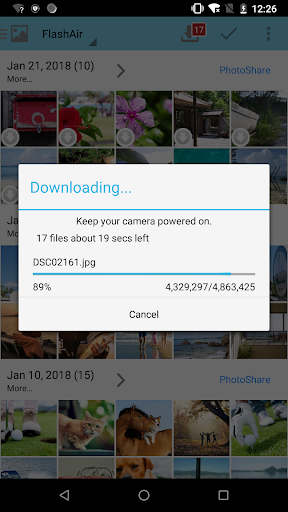
Description
Technical support for FlashAir W-03 Class10, FlashAir W-02 Class10 and FlashAir Class6 on FlashAir App will no longer be available. We appreciate your understanding.
With the FlashAir™ App for Android, you can quickly and easily connect, download and share all the images and documents on your wireless FlashAir™ SDHC/SDXC memory card.
3 browsing modes
- Photo/Movie view shows thumbnails of photos and movies in a single scrollable grid.
- Music view shows music files in a single scrollable list.
- Folder view shows any files within each folder.
Download, share and open files
- Save your files to your Android device.
- The app will download photos and videos from the FlashAir W-04 card automatically based on your setting.
- Share your files via E-mail/Twitter/Facebook/Instagram. *Note: You need an internet connection.
- Open a file in another application.
Configurations
- PhotoShare
- Automatic detection of adding or updating files on FlashAir
- Display settings of photos/videos
- Auto save of photos/videos
- Configuring SSID and security key (password) of the FlashAir™ card.
- Configuring SSID and security key (password) for internet pass thru mode.
- Timeout
- Administration password (MASTERCODE)
- Eyefi Connected setting
[Important notes]
- This application is compatible Android 5.0 - 14.0 devices.
- Please pay attention to following things when you use this App on your smartphone of Android 6.0 basis.
- Please enable location service or GPS mode on your smartphone.
- If you get a trouble in a wireless connection, please set air plane mode before you use this App.
- This application uses a microSD card inserted into the Android device. Error could occur on the Android device with no micro SD card.
- KIOXIA Corporation may modify or discontinue, temporarily or permanently, the Services or Materials, or any portion thereof, with or without notice
- This application may be terminated its service or functions without former notice.
- THIS APPLICATION IS PROVIDED ON AN “AS IS “BASIS WITHOUT ANY WARRANTIES, EITHER IMPLIED OR STATUTORY, INCLUDING IMPLIED WARRANTIES, CONDITIONS OF MERCHANTABILITY, OR FITNESS FOR A PARTICULAR PURPOSE, TO THE EXTENT PERMITTED BY APPLICABLE LAWS. KIOXIA WOULD NOT BE RESPONSIBLE FOR ANY LIABILITY ARISING FROM THE USE OF THIS APPLICATION.