TORIPO - screenshot on the top
jp.cielist.apps.toripo
View detailed information for TORIPO - screenshot on the top — ratings, download counts, screenshots, pricing and developer details. See integrated SDKs and related technical data.
- No items.

Screenshots


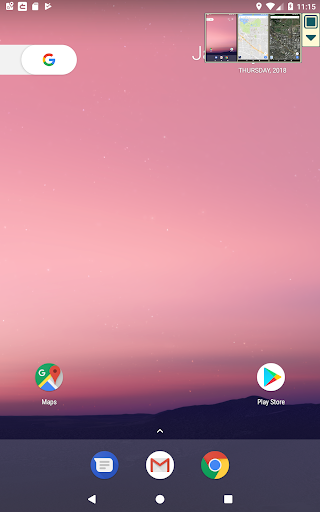
Description
App that displays the screenshots on the top screen!
You don't need to switch between screens anymore.
<< Features >>
- Tap once to take a screenshot.
- The taken screenshot will be displayed on the top screen.
Well, for example ......
- I need to note the security code of a game but too lazy to do it..
- I want to note the changing informations of buses and trains and see it immediately anytime..
- I hate to launch a browser every time to check informations on a HP..
In such a case ......take a screenshot in "TORIPO" to display it on the main screen!
<< How to use >> very easy!
- After starting up the app, press the "start standby".
- You can take a screenshot by pressing the square button in the upper right corner of the screen
- Enlarge the image by touching the taken screenshot.You can also save or delete the image from here.
(It is saved in DCIM folder.)
- By pressing the triangle button, you can switch the display position.
- When you want to exit the app, just press the "Exit" button.
<< Various usage ! >>
- Save the recipes of cooking site
- Note the-reservation number
- Record maps and addresses
<< Limitations >>
This app requires Android 5.0 or later.
In the free version you can take up to 3 screenshots.When you remove the limitation, you can take screenshots until the memory is full.
<< Coming soon >>
- Post on Facebook
- Edit images