PetapetaTextMemo
jp.bebeit.textmemo
View detailed information for PetapetaTextMemo — ratings, download counts, screenshots, pricing and developer details. See integrated SDKs and related technical data.
Screenshots

Description
When it is me , " this a little I want to note " , simply do not leave a note in the text memo?
As a widget on the home screen , it is swollen text memo in the sticky feeling .
Petapeta Series third edition, Petapeta Text Memo!!
If you have , such as there is a hope and trouble to add this kind of functionality ,
I hope you are able to write or e-mail(t.bebeit@gmail.com) to the review .
It will be the corresponding in the range that can be , but I want to improve .
* We do not guarantee the operation on custom ROM, rooted terminal or remodeled terminal.
Also, normal operation is not guaranteed in the case of permission alteration.
【How to use】
①Press and hold the home screen.
②From the widget "- PetapetaTextMemo" I choose.
※ By the specifications of the android , there is a case where the widget list is not updated ,
In that case, You can cope with such as the restart of the body .
③It will be added to the home screen.
④Character of color and size , you can change the background color .
⑤It leaves a nice text memo.
【Function】
①Character of color and size , you can change the background color .
②And vertical, it can be displayed in landscape.
③Press and hold the widget , you can change the size .
④Text memos are saved automatically when the application ends.
【Button Description】
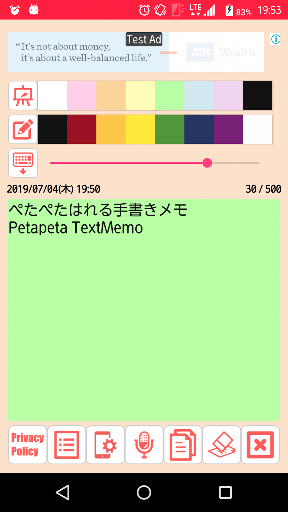
Canvas:You can change the color of the background .
Pen:You can change the thickness and color of the text .
・Press and hold the color button , you will be able to color editing .
List: If you have more than one text memo, and an optional display in the list.
In addition, when you select a text note, you can move to the memo.
Setting:You can change the orientation of the terminal .
Microphone: Voice input is possible. The input is added to the memo.
Copy:It copy the text memo.
Clear:It clear the text memo.
Close:Exit the app.
【Attention】
・Only if you press the Save button , the image is saved .
If you press the button , such as the home button , please note that the return to the state it was in before editing without saving .
In addition, I use the following material Upon production.
・high-resolution icon design : Ms. OKAYU
・Icon rainbow
・ICOOON MONO
【twitter】
@_bebeit ( https://twitter.com/_bebeit )