HandCalendar (Handwriting)
info.androidx.handcalenf
View detailed information for HandCalendar (Handwriting) — ratings, download counts, screenshots, pricing and developer details. See integrated SDKs and related technical data.

Screenshots


Description
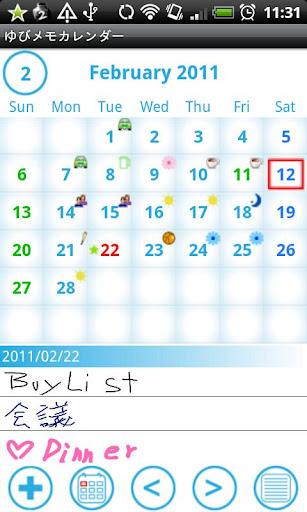
You can take a memo by hand and save it to the calendar.
Write a diary, take a memo, make a shopping and todo list by hand.
You can insert check box in your handwritten memo.
The screen of handwritten memo is divided in three lines and those three make one row of a memo.
You can add memo by hand without limit.
Your handwritten memo will be displayed in the list of the calendar when you register.
When there is the handwritten memo on a date, you can see an icon on the calendar.
Select one memo from the list and your handwritten memo will be displayed to another
screen. Then press "Menu" button, select "Mail" to send your handwritten memo by email.
There are 10 colors to choose from, so let's enjoy making your colorful memo by hand!
There are 3 types of pen to choose for making memo by hand.
*Use the white color as eraser.
*Undo up to 3 times.
Menu
・Add a memo by hand.
・Move to today's date.
・Go to previous day of the calendar.
・Go to next day of the calendar.
・The list of saved handwritten memo.
You can add and save tag name for your handwritten memo, for example, "Shopping List",
"Todo" or "Meeting", and search it later by the tag name.
Add icons (symbols) on your calendar: press "Menu", select "Icon", select a icon you like and tap the
date on which you want to add.
You can select the beginning of the week from "Setting".
※Pay version:No ads display