Vertical Jump Test
hicaltech87.verticaljumptest.sportpowertest
View detailed information for Vertical Jump Test — ratings, download counts, screenshots, pricing and developer details. See integrated SDKs and related technical data.
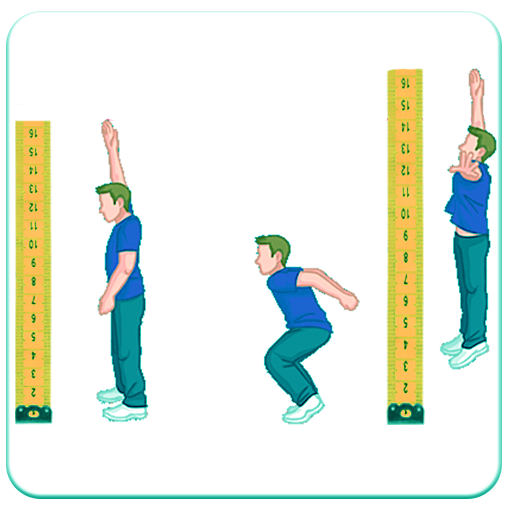
Screenshots


Description
The vertical jump test is a test of lower body power. The test was first described nearly 100 years ago (Sargent, 1921). The procedure below describes the method used for directly measuring the vertical jump height jumped.
Objective
To measure the leg muscle power
Required Resources
To undertake this test you will require:
1. measuring tape or marked wall
2. chalk for marking wall (or Vertec or jump mat).
How to conduct the test
1. The athlete warms up for 10 minutes
2. The athlete stands side on to a wall and reaches up with the hand closest to the wall.
3. Keeping the feet flat on the ground, the point of the fingertips is marked or recorded. This is called the standing reach height.
4. The athlete then stands away from the wall, and leaps vertically as high as possible using both arms and legs to assist in projecting the body upwards.
5. The jumping technique can or cannot use a countermovement.
6. Attempt to touch the wall at the highest point of the jump.
7. The difference in distance between the standing reach height and the jump height is the score.
8. The best of three attempts is recorded.
Tutorial Application Use
After doing Vertical Jump test, then obtained the result of reach height and jump height in cm that must be incorporated into this application.
The data that the app user should enter are:
1. Name
2. Weight
3. Gender
4. Reach Height in cm
5. Jump Height in cm
After the user enters the data, please click the PROCESS button to find out the results of vertical jump score, status, and power (in watts)
If you want to store data that has been calculated, please click SAVE button.
If you want to delete data that has been entered on the data input page please click CLEAR button.
If you want to see the data that has been saved before please click the DATA button.