Pastel UX - Icon Pack
hdfhtt.pastel.app
View detailed information for Pastel UX - Icon Pack — ratings, download counts, screenshots, pricing and developer details. See integrated SDKs and related technical data.
Total installs
134.7K(134,777)
Rating
unknown
Released
unknown
Last updated
August 27, 2021
Category
Personalization
Developer
Hadif Hatta
Developer details
Name
Hadif Hatta
E-mail
hdfhtt@my.com
Website
unknown
Country
Malaysia
Address
unknown
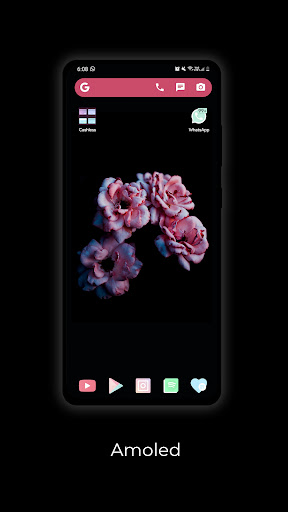
Screenshots


Description
DISCLAIMER THIS APP NEEDS A CUSTOM LAUNCHER INSTALLED TO BE APPLY
WARNING THIS ICON MAY BE TOO BRIGHT FOR YOUR EYES AND TOO CUTE FOR YOU TO USE!
Pastel UX is a soft and delicate pastel-colored icon that based on Google's Material Design guideline.
Pro tips (FAQ)
How to apply these icons?
1. From the main screen, go to Apply tab on the bottom and choose the launcher that you use.
2. Or simply use any Shortcut Creator app.
How to request icon(s)?
From the main screen, go to Request tab on bottom-right corner. Select any app that you want it to be in the future updates. Request icon(s) and select send to email. Done!
How to change icon manually?
From your launcher, hold down any app that you would like to change. Select edit icon and choose from Pastel UX.
Why it is still in early access?
The icons that has been made is still in try-and-error state, some may look goods and some don't. The consistency of these icons are also not that perfect.
Supported launchers:
Action Launcher, ADW Ex Launcher, ADW Launcher, Apex Launcher, Go Launcher, Google Now Launcher, Holo Launcher, Holo Launcher ICS, LG Home, Lawnchair, LineageOS Theme Engine, Lucid Launcher, Niagara Launcher, Nova Launcher, OnePlus Launcher, Pixel Launcher, Posidon Launcher, Smart Launcher, Smart Launcher Pro, Solo Launcher, Square Home, TSF Launcher
Ps: Please don't downrate, I'll be very sad. Love you guys!