TempConvert (°C/°F)
edu.popovic.strahinja.temperature_converter
View detailed information for TempConvert (°C/°F) — ratings, download counts, screenshots, pricing and developer details. See integrated SDKs and related technical data.

Screenshots

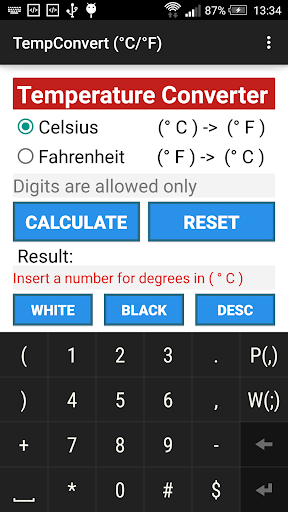


Description
Android application providing calculation output depending on selected Radio button and inserted number (positive or negative), displaying output in the form of basic calculation result according to two main formula for converting those values. The first one is formula for converting Celsius into Fahrenheit (°C->°F) degrees if and only if Celsius Radio button is checked as follows: °F(°C) = [ °C(input) * 9/5 + 32 ]. The second one is formula for converting Fahrenheit into Celsius (°F->°C) degrees if and only if Fahrenheit Radio button is checked as follows: °C(°F) = [ (°F(input) - 32) * 5/9 ]. If there is no inserted numbers in the input field but Calculate button is pressed, an error message will be displayed, depending on which Radio button is checked, so if Celsius Radio button is checked message will display: Insert a number for degrees in (°C), otherwise will be displayed message: Insert a number for degrees in (°F). Application displays error message if any wrong input is inserted as follows: Numbers are allowed only. Reset button displays default state and clear all field and checks Celsius Radio button. Application provides Black mode when black background is applied. Also, application containing few extra pages for explaining it's functionality in the form of description. Application provides functional menu to navigate between pages (Activities). At the end, there is description page about used tool, program, software and device that is used for developing and testing application.