Bass Booster - Audio Enhancer
com.wolfieapps.bassbooster
View detailed information for Bass Booster - Audio Enhancer — ratings, download counts, screenshots, pricing and developer details. See integrated SDKs and related technical data.

Screenshots


Description
Transform Your Audio Experience with Bass Booster
Elevate every song, podcast, video, and audio track with powerful bass enhancement that works across your entire device. Bass Booster is a simple yet effective audio enhancer designed to bring deep, rich bass to all your favorite media.
🎵 Key Features:
• Universal Bass Enhancement – Works seamlessly with Spotify, YouTube, Netflix, and all music and video apps
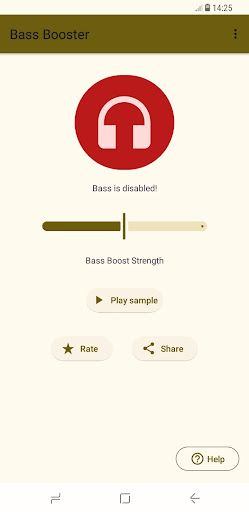
• Adjustable Bass Strength – Fine-tune your bass levels with an easy-to-use slider for the perfect sound
• One-Tap Activation – Enable or disable bass boost instantly with a single tap
• Sample Audio Player – Test and preview the bass effect in real-time before applying it
• System-Wide Audio Boost – Enhance bass for games, videos, music, calls, and more
• Persistent Notification – Quick access to controls right from your notification panel
• Lightweight & Fast – Minimal battery usage with maximum audio impact
🎧 Perfect For:
✓ Music lovers who crave deeper, punchier bass
✓ Headphone and speaker users seeking richer audio quality
✓ Watching videos and movies with enhanced sound
✓ Gaming with immersive audio effects
✓ Podcast and audiobook enthusiasts
📱 How It Works:
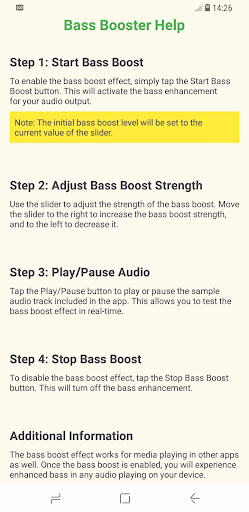
1. Install Bass Booster and launch the app
2. Tap the headphone icon to enable bass enhancement
3. Adjust the bass strength slider to your preference
4. Test the effect using the built-in sample audio player
5. Enjoy enhanced bass across all your apps – music, videos, games, and more!
Once enabled, Bass Booster works automatically in the background, enriching your audio without any additional configuration. Simply adjust the strength whenever you want a different listening experience.
🔊 Why Choose Bass Booster?
Unlike complex audio apps with overwhelming options, Bass Booster focuses on one thing: delivering powerful, high-quality bass enhancement that just works. No confusing settings, no steep learning curve – just better sound with a few simple taps.
Whether you're streaming music, watching YouTube, playing games, or making calls, Bass Booster ensures every sound is fuller, richer, and more immersive. Compatible with headphones, Bluetooth speakers, wired earbuds, and device speakers.
⚡ Start Enjoying Better Sound Today!
Download Bass Booster now and experience your favorite audio like never before. Free to use with optional ad support.
Note: Audio enhancement performance may vary depending on your device's hardware capabilities and current audio output settings.