SH053 Watch Face, WearOS watch
com.watchfacestudio.sh053
View detailed information for SH053 Watch Face, WearOS watch — ratings, download counts, screenshots, pricing and developer details. See integrated SDKs and related technical data.
- No items.

Screenshots


Description
All watch faces: https://play.google.com/store/apps/dev?id=7427443638746033211
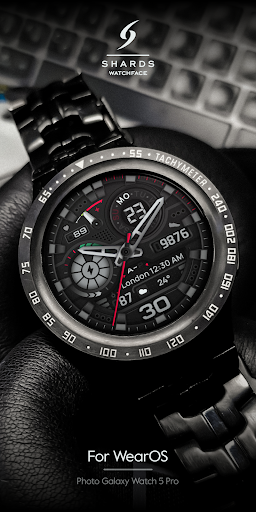
The SH053 is a Analog watch face for Wear OS by Shards.
Shards is the perfect choice of watch faces for Wear OS smartwatches. Analog, digital, hybrid watch faces for your watch.
Watch face installation notes on smart watch:
Phone app serves only as a placeholder to make it easier to install & find the watch face on your Wear OS watch. You have to select your watch device from the install dropdown menu
TELEGRAM:
https://t.me/joinchat/TxsjXaUXKMQgqn5N
FACEBOOK:
https://www.facebook.com/groups/655756995056226/?ref=share
INSTAGRAM:
https://www.instagram.com/shards_watch_face
Watch face features:
- Analog time
- Heart Rate
- Day of week
- Date
- Steps*
- Battery %
- 2 Preset Shortcuts
- 4 customizable shortcuts
- Customizable field / complications
- Always On Display
- Changeable background
- Changeable colors
- Changeable hands
- Distance *, **
* Shows the value of the sensors(Steps/Distance ) in turn - 5 seconds. In AOD mode, only the number of steps taken is displayed.
** Mileage will automatically show on devices with language set to UK and US English. For other languages, the distance will be shown in KM.
Watch face customization:
1 - Touch and hold display
2 - Tap on customize option
Some features may not be available on some watches.
Not Suitable for Rectangular Watches.
This watch face supports all Wear OS devices with API Level 30+
All watch faces: https://play.google.com/store/apps/dev?id=7427443638746033211