JW160 jwstudio
com.watchfacestudio.jwstudio_a_160
View detailed information for JW160 jwstudio — ratings, download counts, screenshots, pricing and developer details. See integrated SDKs and related technical data.
- No items.

Screenshots


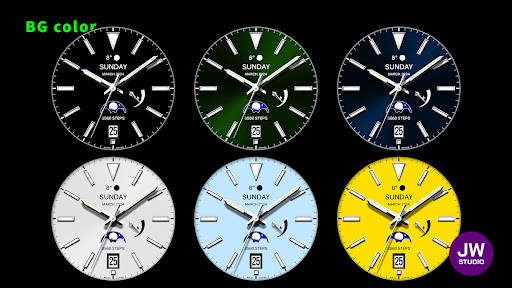
Description
This watch face supports all Wear OS devices with API level 30 or higher, such as Samsung Galaxy Watch 4, 5, 6, 7, 8, Pixel Watch, etc.
+++++++++++++++++++++++++++++++++++++++++++++++
[How to install]
Before pressing the payment button, make sure your watch is selected.
Select your watch by pressing the small triangle next to the payment button.
Select the menu at the top right of the Play Store app (three dots) > Share > Chrome browser > Install on other devices > Clock and proceed.
After installation, select it from the download list, register it as a favorite, and use it. You can view the download list by clicking 'Add Watch Screen' on the far right of the favorites list that appears when you press the watch screen.
+++++++++++++++++++++++++++++++++++++++++++++++
[function]
- 2 preset app shortcut
- 2 customizable shortcut keys
- 1 customizable fields/information display
- Changeable background color, hands, index
+++++++++++++++++++++++++++++++++++++++++++++++
[Custom]
1 - Touch and hold the display.
2 - Tap on Custom Options
For inquiries, please contact the email below.
jenniferwatches@gmail.com