Flip Machine Animated
com.watchfacestudio.FlipMachineAnimated
View detailed information for Flip Machine Animated — ratings, download counts, screenshots, pricing and developer details. See integrated SDKs and related technical data.
- No items.
Screenshots


Description
WATCH FACE INSTALLATION NOTES:
Check your watch's compatibility with WEAR OS before proceeding with the installation.
(Note: Galaxy Watch 3 and Galaxy Active are not WEAR OS devices.)
How to install Watch Face To Wear OS Watch follow the link below:
https://drive.google.com/file/d/1ImPlWZFNPQwox8T8cEQUBKP-e4aT2vWF/view?usp=sharing
✅ Compatibility:
Compatible with devices running Wear OS 4.0 API 34+ and later.
🚨 Watch faces don't automatically apply on your watch screen after the installation.
That's why you MUST set it on your watch's screen.
Features:
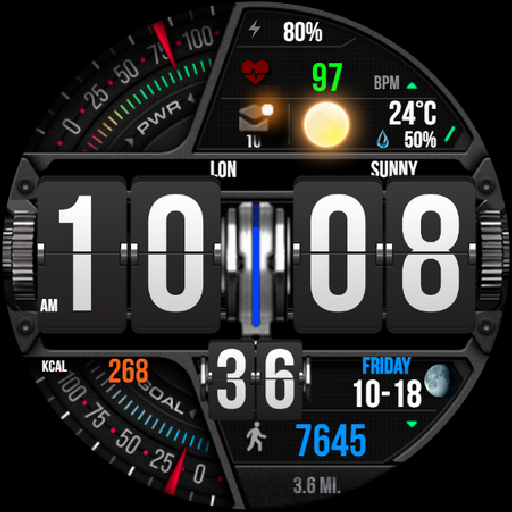
- Effect Notification message
- Digital Styles (12/24 Hour Time format)
- Time Styles flip
- Date , Day of week , Month , Moon Phase
- Steps Count , Heart Rate , Battery Level , Count message unread
- Switching Between KM/MILE
- Chance Of Precipitation
- Weather
- Changeable backgrounds
- Changeable Colors day by day
- Battery subdial with red indicator at 15%
CUSTOMIZATION:
1. Press and hold display then hit "Customize".
2. Swipe left and right to choose what to customize.
3. Swipe up and down to choose options available.
4. Hit "OK".
PRESET APP SHORTCUTS:
- Shortcut Steps day
- Shortcut Heart rate / Heart rate (Zone)
- Shortcut Settings
- Shortcut Stopwatch
Link install
https://play.google.com/store/apps/details?id=nl.slisky.stopwatch
CUSTOMIZABLE APP SHORTCUTS
1. Press & hold display then Customize
3. Find Complication, single tap to set preferred app in the shortcuts.
For further support, please contact: ejimatsus@gmail.com
Thank you for Your support.