One Button Phone
com.venyard.one_button_phone
View detailed information for One Button Phone — ratings, download counts, screenshots, pricing and developer details. See integrated SDKs and related technical data.

Screenshots


Description
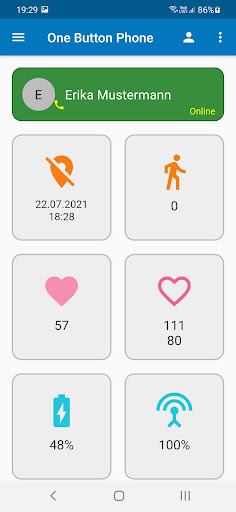
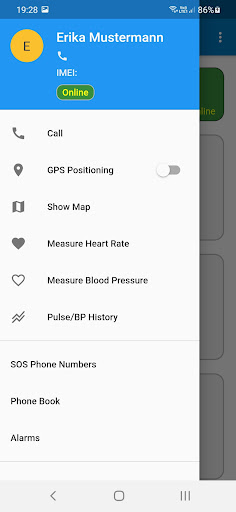
This app connects your smartphone with the One Button Phone and helps you to program your device and gives you an overview of the location, measurement data for pulse and blood pressure as well as the reception and charge status. You can also add several One Button Phones in the app and switch to the corresponding control and programming. To connect, you need to register with your email address and then the IMEI number of the One Button Phone. You can then use the app to define three SOS numbers (call cascade) for your One Button Phone. You can also enter up to ten contacts in the phone book of the One Button Phone. By optionally activating the white list, the One Button Phone only receives calls from these contacts. The app shows you the location of your One Button Phone. You can activate the GPS of your device with the app to always get an exact position. The measurement data of the pulse and blood pressure measurement of your One Button Phone are also displayed on tiles in the app. In the side menu you can display the heart rate and blood pressure history of the last ten measurements. You can also remotely activate the pulse and blood pressure measurement of the One Button Phone in the menu and receive the data on the tiles on the main screen of the app. When wearing the One Button Phone, the steps are automatically counted and displayed in a tile on the main screen. You can set up alarms for the One Button Phone (alarm clock, reminders). You can activate or deactivate notification functions under in the settings or in the user account. In the One Button Phone App, you will receive messages about incoming calls via the SOS button and will also be informed when the charge level of the One Button Phone is too low. The charge status and reception strength of your One Button Phone are also displayed in tiles in the app.