Nimble Keyboard
com.stheodore.nimblekeyboard
View detailed information for Nimble Keyboard — ratings, download counts, screenshots, pricing and developer details. See integrated SDKs and related technical data.
Screenshots


Description
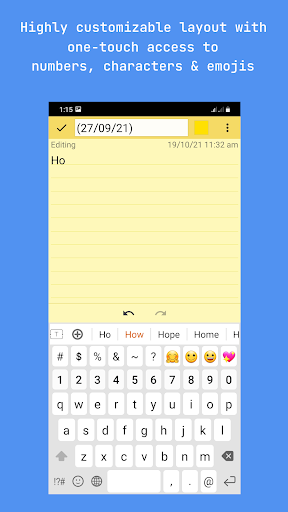
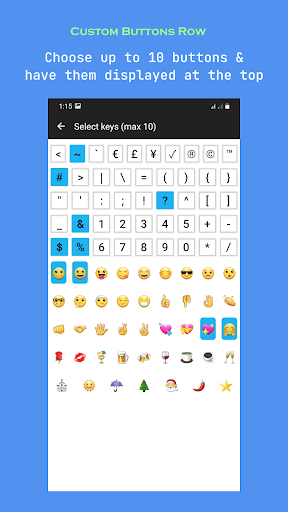
Message quickly using your own predefined texts, customize layout, font & colors and quickly switch between alphabets, numbers and emojis. Nimble Keyboard allows you to customize almost every element of the user-interface to make it look and function the way you want, including choosing your preferred keys for a custom row. It is designed to message effortlessly by using unique layouts that eliminate repeated switching between layouts while entering alphabets, numbers and characters together (e.g) while entering usernames and passwords.
Highlights
👍 Enter usernames and passwords quickly with the help of custom keys selected by you
✔️ Type numbers, characters & symbols without switching views
👍 Effortlessly enter email and website addresses - email and domain name suggestions appear when you type @ and dot respectively
👍 Manage your own predefined text - enter a Birthday greeting, your email, your address etc. by selecting from a predefined list created by you
✔️ Option to include predefined text in text prediction - (e.g) typing just 'B' allows you to select 'Birthday Greeting' without the need to open the predefined list and then select
✔️ Current word suggestions
✔️ Next word prediction
👍 Auto-complete using highlighted word when space or dot key is pressed
✔️ Add new words to dictionary
✔️ Automatically switch to the alphabet layout after selecting an emoji
Backup & Restore
✔️ Backup the dictionary and your own predefined text entries to various places like GDrive, Email, Bluetooth etc.
✔️ When you reinstall the app or install it on a new device, you can restore the dictionary from backup
Customize look & function
✔️ Option to choose between regular and modified QWERTY layouts
👍 Navigation row with arrow keys as well as Home, End, PageUp and PageDown keys
✔️ Change font size as well as the font type - three options for font size and five for font type
👍 Change the width of the alphabet rows as well as the spacing between keys
✔️ Customizable built-in color themes - pick your own color for background, button and text for any theme using a simple and easy to use color picker. You can even choose one color for alphabets and another for numbers.
👍 Adaptive night theme (Dark Mode) setting - automatically switches between dark and light modes based on android system setting
✔️ Permanent night theme setting - make the dark mode permanent if you like it that way
✔️ Customizable dark mode colors - just like any other theme you can customizable the dark theme too to your liking