Muviz Widgets: Clock, Music.,
com.sparkine.widgets
View detailed information for Muviz Widgets: Clock, Music., — ratings, download counts, screenshots, pricing and developer details. See integrated SDKs and related technical data.
- No items.

Screenshots

Description
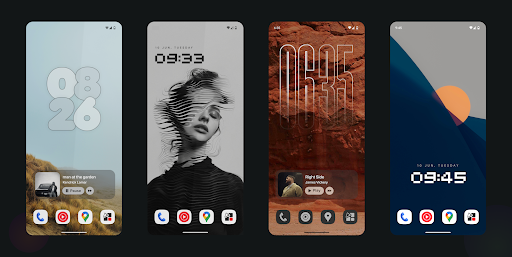
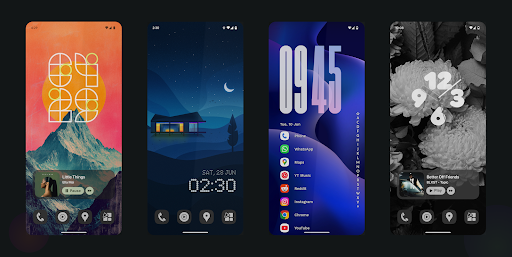
Muviz Widgets presents you with growing set of carefully handcrafted widgets for your home screen and lock screen. All our widgets are perfected to pixel for scalability and efficiency.
NO THIRD PARTY APPS REQUIRED
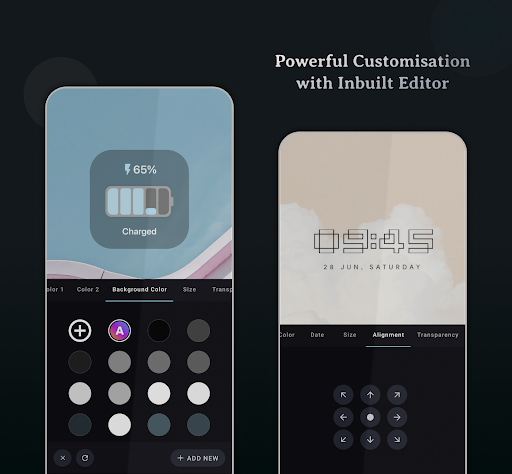
Our widgets matches and follows the Material You Theming / System Color Theming by default, and can also be personalised using our inbuilt editor. It's a perfect personalisation companion to add beautiful and efficient widgets to your new age devices.
Battery Efficient
Our widgets are carefully developed to consume as little memory and energy as possible with latest guidelines.
Growing set of Widgets
We have a growing set of efficient widgets which can be used independently without any requirement of third party apps.
Some of the Widgets are
• Android 14's Clock Widgets
• Android 15's Clock Widgets
• Google Pixel Clock Widgets
• Nothing Clock Widgets
• Big Retro Clock Widgets
• iPhone (or) iOS style Music Widget
• Battery Widgets
and more to come.
Customizable to the Core
Our widgets can be extensively customised with our powerful inbuilt editor similar to our other Muviz companions.
Personalised Color Galore
The app allows you to customize the widget colors in many possible ways.
• Material You Theming.
• Automatic system colors.
• Select colors from a set of available stocks.
• Automatically apply colors from current album art.
• Add your own custom colors.
Facing issues? don't hesitate to drop us a mail at support@sparkine.com