Image Measure
com.software.backcasey.imagemeasure
View detailed information for Image Measure — ratings, download counts, screenshots, pricing and developer details. See integrated SDKs and related technical data.

Screenshots

Description
*Use with the understanding of "set as reference" in the explanation below. It is a wrong usage that the length value changes when scaling up/down the image.
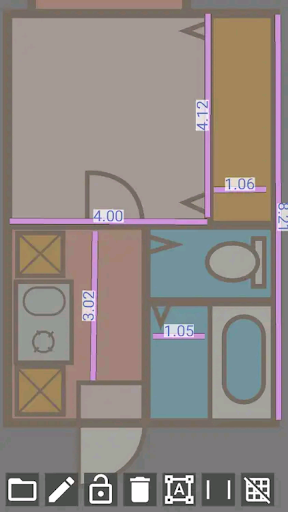
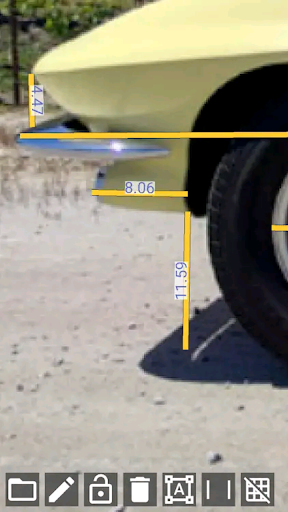
Draw a line as a reference length on the image. Once the reference is set you can measure any place on the image as relative length based on the reference.
Usage examples)
- Measuring arbitrary part of neighbour's car from blueprint
- Measuring the bath room size from floor plan
- Measuring the height of a celebrity who falsely claiming to be taller than he/she is.
How to use
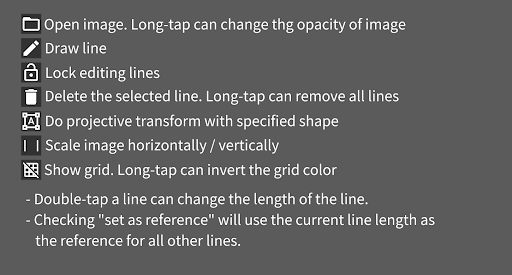
1. Load an image, tap the pen icon to enable it, and draw a straight line.
2. Disable the pen icon and double-tap the straight line.
3. Enter the actual length of the straight line on the image. At this time, check the “Set as reference” checkbox. You can decide the unit of length by yourself; enter 1 for 1 meter, 100 for 100 cm, etc.
4. Touch the pen icon and draw another straight line to display the length relative to the reference line.
The app is for 2D image, but you can transform perspective image into a plane so you can measure them (in that case you need to have TWO known lengths as vertical and horizontal as the reference)
FAQ
Q: Line length changes on scaling
A: Before setting a reference the line length is the same as screen pixel size. Please set the reference.
Q: I can't specify unit!!
A: You should know the unit because you type the reference. You can convert the length as centi-meter or percec whatever you want.
Q: After transforming the image flew away from the screen
A: It is because of the calcutation. Please try tweaking the transform shape.
Q: After transforming the lines shifted from the image
A: Transforming doesnot effect to lines. Draw lines after transforming.