MetalDetector
com.softnerd.metaldetector
View detailed information for MetalDetector — ratings, download counts, screenshots, pricing and developer details. See integrated SDKs and related technical data.
- No items.

Screenshots

Description
Metal Detector – Your Portable Phone‐Based Metal Finding Tool
Ever dropped a screw in the carpet or wondered what’s behind your walls? Metal Detector transforms your Android device’s built‑in magnetometer into a professional‑grade metal detector—no extra hardware required. Hobbyists, DIYers, educators, and curious explorers can now instantly identify hidden metal objects, map magnetic fields, and document discoveries right from their phone.
🔥 Key Features
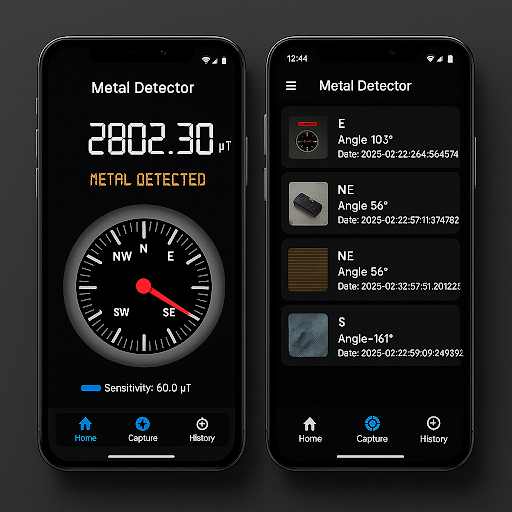
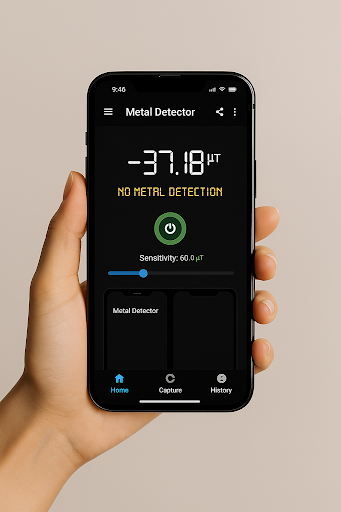
Magnetic Field Detection – Real‑time µT (microtesla) readings of positive and negative polarity as you sweep your device.
Adjustable Sensitivity – Fine‑tune the detection threshold to filter environmental noise and zero in on tiny metal objects.
Audio & Vibration Alerts – Choose sound, vibration, or both to notify you the moment metal is sensed—perfect when you’re focused on the hunt.
Easy Calibration – Guided figure‑8 calibration and interference warnings keep readings accurate and reliable.
Visual Meter & Graph – Dynamic on‑screen meter and live graph plot changes in magnetic intensity, helping you pinpoint objects precisely.
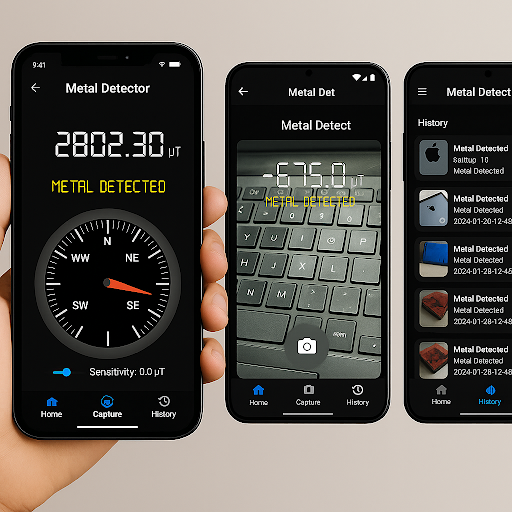
Photo Capture & Overlay – Snap a photo of your target with the current µT value overlaid, so you never forget where you found it.
Scan History Log – Automatically save and review past scans with timestamps and readings.
Lightweight & Ad‑Free – Fast startup, minimal footprint, and no disruptive ads—just pure metal detection.
📈 Why Metal Detector?
Professional‑Grade Accuracy – Leverage your phone’s sensor for trustworthy results in everyday and demanding scenarios.
Versatile Use Cases – From finding lost keys to pre‑drilling wall inspections, the app adapts to both hobby and professional needs.
Offline Ready – All core functions work without internet—ideal for fieldwork, workshops, or remote treasure hunts.
Battery‑Frugal Design – Optimized to minimize power draw during extended scanning sessions.
🛠 Practical Uses
Locate Fallen Items – Quickly recover dropped screws, nails, keys, or jewelry on carpet, grass, or concrete.
Home Improvement – Scan walls and floors to detect studs, wires, or pipes before drilling.
Treasure Hunting – Unearth coins and small metal artifacts in parks or beaches.
Educational Tool – Demonstrate magnetism in classrooms and workshops—study field strengths and polarity with visual feedback.
❓ Frequently Asked Questions
Q1: How does Metal Detector detect metal?
It reads local magnetic field variations via your phone’s magnetometer and displays spikes in µT values whenever metal is nearby.
Q2: Can I adjust how sensitive the detector is?
Yes—slide the sensitivity control to set the µT threshold that triggers alerts, filtering out background interference.
Q3: Are audio and vibration alerts mandatory?
No—enable or disable beep sounds and vibration separately, tailoring notifications to your environment.
Q4: How do I calibrate the sensor?
Follow the on‑screen instructions (move your phone in a figure‑8) until calibration completes; the app warns if interference persists.
Q5: What’s the photo capture feature?
Tap the camera icon to take a snapshot of your scene with the current magnetic reading superimposed, perfect for documenting discoveries.
Q6: Is there a record of past scans?
Yes—visit the History tab to view prior readings, timestamps, and saved images.
Q7: Will it drain my battery?
Metal Detector is optimized for efficiency; monitoring battery level in Settings lets you manage runtime effectively.
Unlock hidden metals all around you—download Metal Detector now on Google Play and start exploring! 🕵️♂️🧲