新光行動保鏢
com.skbank.guard
View detailed information for 新光行動保鏢 — ratings, download counts, screenshots, pricing and developer details. See integrated SDKs and related technical data.

Screenshots



Description
Welcome to Shin Kong Action Bodyguard Service Android App
"Xinguang Mobile Bodyguard" is a fast and convenient identity authentication mechanism. There is no application fee. It only needs to be bound to your mobile device (mobile phone or tablet). Users no longer need to use additional hardware security equipment, nor do they need to bear the burden of traditional text messages. The risk of OTP being maliciously intercepted and forwarded is to provide users with the best user experience. You can apply for various services at online banking, mobile banking, non-agreed transfers and other digital financial transactions, as well as at the cloud service desk.
You are welcome to contact Shin Kong Bank branches across the province to apply at the counter or apply for [Mobile Bodyguard] and [Mobile Bodyguard Non-agreed Transfer Account Settings] at Shin Kong Network ATMs, and then use the mobile device (mobile phone, tablet) you want to bind. Download the "Sing Kong Mobile Bodyguard" APP, enter the [Verification Code] and [Device Serial Number] provided by the Bank when applying, complete the registration process, and you can transfer or pay anytime and anywhere.
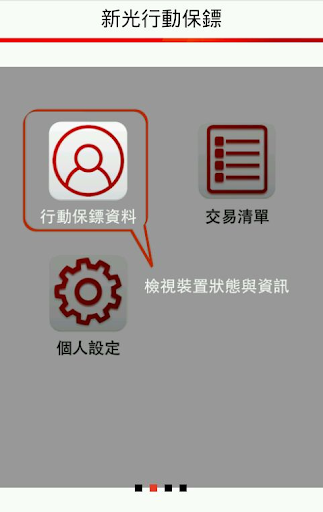
service function:
1.Mobile Bodyguard Information: View device status and information
2. Transaction list: View recent transaction verification list
3. Personal settings: Set mobile bodyguard nickname and view related information
Precautions for use:
1. Please note that the push confirmation transaction is only valid for 3 minutes. Please complete the confirmation within the time to avoid transaction timeout.
2. Your bound device (mobile phone/tablet) must have the push notification function turned on so that the push notification of transaction confirmation can be displayed normally!
3. [Device Serial Number] and [Verification Code] are valid for 30 days. If not registered after the expiration date, they will become invalid.
Safety information:
1. Our Bank App passes various security tests every year, including the OWASP Mobile test and the "Mobile Application APP Basic Security Test" by the Industrial Bureau of the Ministry of Economic Affairs. Please feel free to use it if it is safe.
2. Small reminder: Please use an uncracked mobile phone, download Shin Kong Mobile Banking and anti-virus software from the official software store, and update the mobile phone and anti-virus software regularly.
Description of usage rights:
When using this App, the relevant application permissions will be referenced as follows:
1. android.permission.CALL_PHONE Telephone: You can use the customer service hotline function to call Shin Kong Bank customer service.
2. com.willmobile.mobilebank.skbank.permission.ACTIVITY_RESULT Return to Shin Kong Bank: If customers want to apply and bind Shin Kong Mobile Bodyguard, they can open Shin Kong Mobile Bodyguard App for verification and return to Shin Kong Bank App.