SGS Connect
com.sgs.flutter.sgsconnect
View detailed information for SGS Connect — ratings, download counts, screenshots, pricing and developer details. See integrated SDKs and related technical data.
- No items.

Screenshots

Description
SGS Connect is a productivity mobile app for SGS Certification auditors to assist them in all their logistical needs before, during, and after their audits through 4 main features:
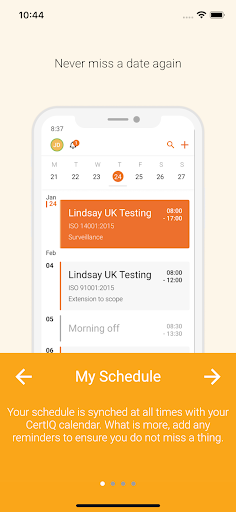
My Schedule: provides a calendar functionality that clearly reflects your upcoming and past audits and enables you to create reminders to stay on top of all necessary activities.
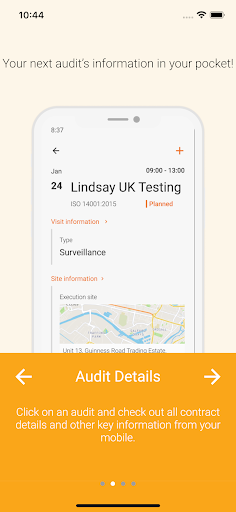
My Audits: includes all the logistical information needed to prepare and take part in the audit.
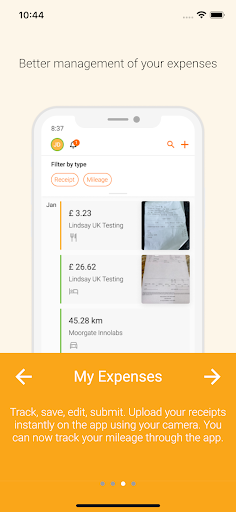
My Expenses: allows you to upload receipts and mileage information, add comments and categories, and send this information to SGS for prompt handling of your audit expenses
Support: enables you to chat with an SGS Representative in order to get assistance with the use of SGS Tools during the audit.
----------------------------------------------------------------------------------------
Requirements and Troubleshooting
• Android 8 or higher.
• SGS account.
• Google Play Store application installed.
• In case you are using a Managed Device (SGS owned, and managed under our MDM solution), downloading the App must be done through the Google Play Store enterprise App, under the Work profile. See the General section below.
• In case you are using an Unmanaged device (Personal or SGS owned, but not managed under our MDM solution), the App can be downloaded from the Google Play Store App.
General
• To see data you must have allocations created in the backend system.
• If any problems arise when installing the App on a Managed Device, you must contact your country's Help Desk Team, which will help you to resolve the issues to install and execute the SGS Connect App.