Time:Card - Sync Calendar
com.ryapps.timecard
View detailed information for Time:Card - Sync Calendar — ratings, download counts, screenshots, pricing and developer details. See integrated SDKs and related technical data.
Screenshots



Description
Simple time card.
Tap to record in Google Calendar & totaling & make CSV(in the full version).
Let's create your favorite time cards such as work, hobbies, sleeping time, and record their start / end times on a daily.
For example, if you record working hours, it helps to make a monthly report for your company.
■Easy to use. Tap the time card to record the current time.
■The recording destination is Google Calendar. The calendar application launches with the icon on the left of the toolbar.
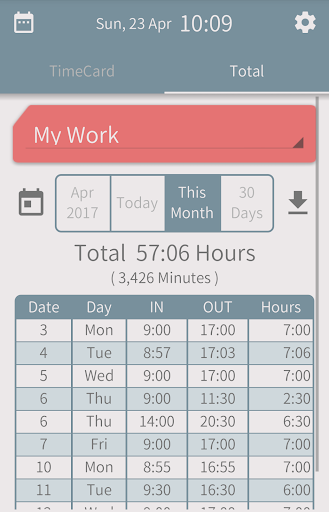
■In Total view, you can display records in monthly, past 30 days, etc, and check the totaling time.
■In the full version, download the totaling to the CSV file. The file is auto attached to the e-mail and can be sent.
■Tips
・Up to 8 arbitrary time cards can be created.
・Tap the time card to record the current time as the start of the event. Tap again to end. From start to end as one event, the event is up to 5 times a day.
・Set the property of each card by the icon at the top right of the time card.
・"Closing time of the day" is the time when the date switches. On the Total view, total from this time to the same time of the next day as a day event.
・"Break time" is the time zone to deduct when totaling. This time zone can be set at two places per day.
* A Google account is required to use this application. Need permissions for the Calendar and Contacts(for confirm Google account).
* Some of the functions can be used only in the full version. Furthermore, full version does not display ads. Please purchase the updater by "Buy full version" in the Setting view!!
* Above Android 4.2, this application is available.