RouteNAVI
com.routenavi.routenavi
View detailed information for RouteNAVI — ratings, download counts, screenshots, pricing and developer details. See integrated SDKs and related technical data.

Screenshots



Description
【Overview】
This app downloads the course from "Ride with GPS" and displays the course information on the map. You can also track your current location and navigate the displayed course.
■■■ Course display ■■■
[How to download and display the course]
① Download course information
Tap the leftmost gear button, then tap Get from Ride with GPS. Enter the URL you want to download in the displayed dialog and press "OK".
② Tap the leftmost gear button, then tap the "Course selection button".
[How to place and display GPX files]
① Download course information
A "MapData" folder is automatically created in the internal storage of your smartphone. Place the GPX file in that folder.
② Tap the gear button on the far left of the screen, then tap the "Course selection button".
■■■ Each function ■■■
[Altitude graph]
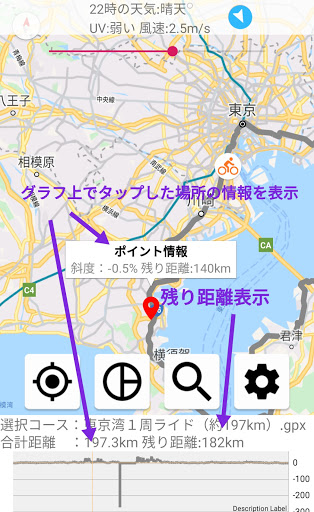
The altitude graph of the course is displayed at the bottom of the screen.
By tapping the graph, the slope and remaining distance at the time of tapping are displayed.
[Navigation function]
The navigation function can be switched between the following three patterns.
・ Navigation function OFF: Used to check the course.
・ Navigation function ON ①: The map moves so that the current location is in the center of the screen.
・ Navigation function ON②: In addition to the function of ①, the map rotates so that the direction of travel is at the top of the screen.
The mode switching is the leftmost button.
[Derailment check function]
If you are not driving along the course, you will see an alert on the screen.
ON / OFF is the second button from the left.
[Search function]
You can search for nearby convenience stores by tapping the right or second button.
Press and hold to remove the marker.
* Up to 60 items can be displayed by using the API.
【setting change】
Tap the rightmost gear button, then tap the advanced settings button.
You can change the color and thickness of the course and the current location marker.
[Weather display]
The current weather, wind speed, wind direction, and UV index are displayed at the top of the screen. (Updated every 15 minutes)
If the rain forecast comes out within the last 5 hours, a rain caution mark will be displayed.
【Finally】
I created it with the hope that it can be used by those who feel that the screen is small when using a cycle computer navigation system, or those who are worried about purchasing a cycle computer with a navigation function at a high price.