Fitness Counter Voice Smart
com.robotnation.fitnessplayerads
View detailed information for Fitness Counter Voice Smart — ratings, download counts, screenshots, pricing and developer details. See integrated SDKs and related technical data.
- No items.

Screenshots



Description
Innovative VOICE Counter for any type of Fitness workout sets (crunches, donkey kicks, all kinds of pushups, ...)
Perks :
1 - VOICE & Sounds : You don't have to watch the screen ! Fitness Counter Voice Smart displays and counts your sets out loud in your language and notifies you with bells and buzz sounds.
=> You don't lose your count and you can fully focus on your moves (and/or your motivational music ;])
2 - Smart Performance :
Fitness Counter Voice Smart works with any kind of fitness workout set.
IMPORTANT : MAKE SURE TO CAST A SHADOW on your device during your set.
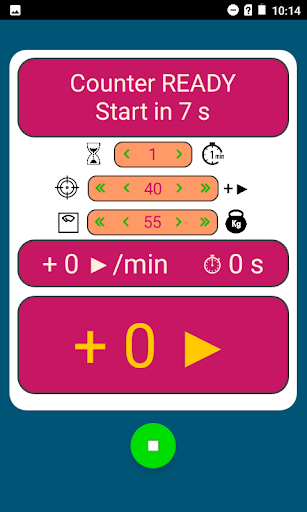
To start your set, just press PLAY. You'll hear a 10 seconds count down. When you hear the bell, GO!
To stop, press STOP. You'll see your result.
To go again, press REWIND. You'll hear a 10 seconds count down. When you hear the bell ...
Additionally, you can easily set some challenges up :
- Target count to attain. The app will cheer you up when you reach your target :]
- Time limit. The app will buzz when time is up
Fitness Counter Voice Smart also displays your speed up to your latest move
Remarks :
- At first, it may take you a few tries to find your device optimal position, then you're good to go!
- If your phone lacks the proper sensor, Fitness Counter Voice Smart will default to the proximity sensor so you'll have to work real close...
This free version uses online ads, so you can't use it offline.
If you want to get rid of the ads and be able to work of offline, you need to purchase the paid version of the app.
That's it, enjoy!
GO! GO! GO! ;)