My App Manager & Analyser
com.ravitechno.appmanager.analyser.apppermission.manager
View detailed information for My App Manager & Analyser — ratings, download counts, screenshots, pricing and developer details. See integrated SDKs and related technical data.

Screenshots

Description
App Manager & Analyzer is simple app manager for your android device. App manager will allow you to see the apps content which you will never find while using the app. We allow you to see all it's components, all permissions that are use by application, Certificates of any app, etc...
Features of My App manager:
- App Manager allows you to track your app usage with all time management.
- You can see the detailed information of any app that is installed in your mobile phone.
- Directories of app where is your apk places by the android system, data folders, native libraries, etc...
- You can get the information of all components used by the app including activities, services, broadcasts, providers, etc...
- Get the detailed data of every activities, services, broadcasts, providers, etc...
- Get full access of every apps Manifest file to get overview of full app use.
- One click uninstall.
- Manage all your app at one place (launch, app detail, Clean, share etc.)
- You can even trace a unknown app which installed in your device and threating your privacy or device storage .
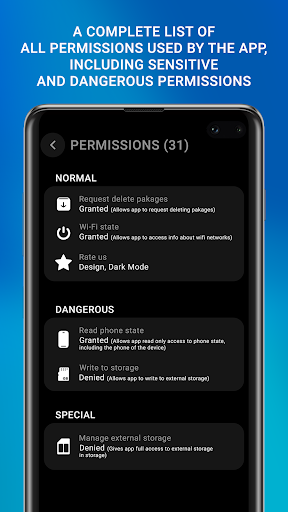
- Know about each and every permission taken by any app.
- Get rid of some of the bloatware your device has.
- Share app as link or APK file
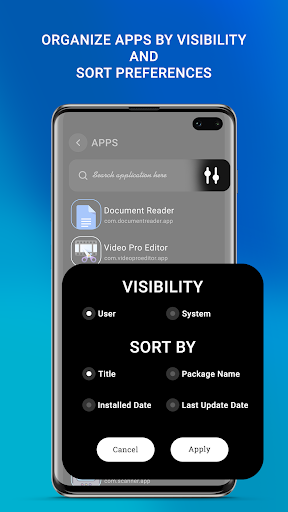
- Filter apps by:
(1) System app or installed app
(2) Title, Package Name, Installed Date, Update Date
(3) Hide Current App
- App info
It's all about the details
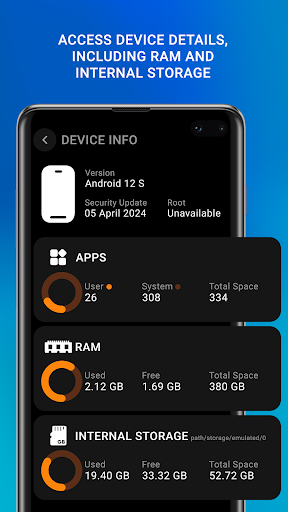
App Analyzer provides a wealth of details about all user and system apps. A huge amount of detailed information, starting from the installation date and ending with a detailed report of apps memory usage.
• Interface customization, to make App Manager look like you prefer;
• Apps usage reports to determine the amount of time spent in each app and the amount of data it consumes;
• Detailed statistics for all apps;
Best of all, it's free ! ! ! Download Now
Permissions explanations
• READ_EXTERNAL_STORAGE/WRITE_EXTERNAL_STORAGE - finding APK files to install/remove them
• PACKAGE_USAGE_STATS - to get recently launched apps and apps' sizes
Thanks & Enjoy!