Work Hours Tracking & Billing
com.rapidtech.hourstracking
View detailed information for Work Hours Tracking & Billing — ratings, download counts, screenshots, pricing and developer details. See integrated SDKs and related technical data.
Screenshots

Description
Work Hours Tracking & Billing is a smart, simple, and fun new hours time tracking app that helps you calculate your work hours and earning. Work Hours Tracking & Billing changes the way you manage your jobs and work hours. From quick and easy time entry to manage your job schedule; it makes your life easier. It is the best work calculator for freelancer or perhaps you working as a business contractor.
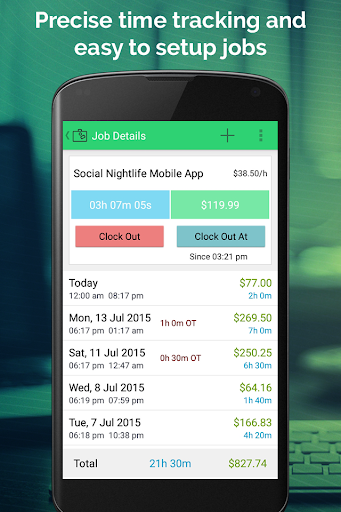
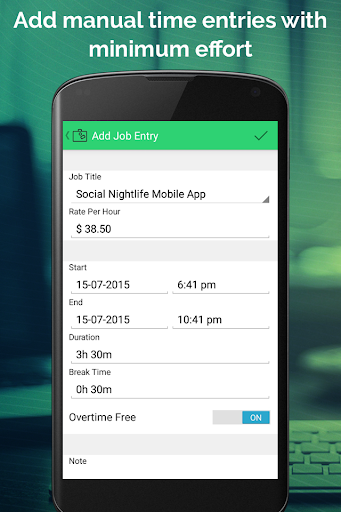
With this time tracking app, you can setup multiple jobs and record your daily working hours by simply clicking on the clock in button. By clicking clock out button, time entries are created automatically. It automatically calculates everything including your overtime and break time. It can record work time using the timer, supports pay period, reports and calendar. You can enter manually time entries as well, you can pick any time to start and stop, break and overtime (daily & weekly) with comment for the each time entries.
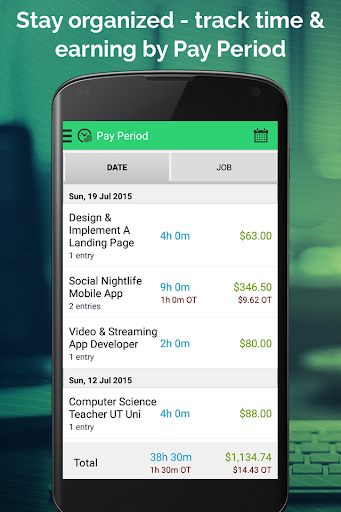
It gives you exclusive reports by weekly, monthly, quarterly and yearly. It calculates your earning based on the defined pay period for multiple clients or jobs. You can also export your work logs by email in format of PDF, CSV or HTML.
So, what are you waiting for? Organize your sales or work time log today with Hours Tracking.
With this app you can:
• Quickly add multiple jobs and track real time hours/earning salary
• Track work timers even in the background or when you use other apps
• Calculate shift earnings for different pay rate for different jobs
• Pick up any time to start and stop the job
• Add manual time entries log with punch in & punch out time
• Easily recognize the timer start time and how many hours you’ve worked
• Enter notes or comments to your shift or job time entries
• Automatically calculate earnings for the overtime, if set
• Set two thresholds with different rate for daily and weekly overtime
• Use “Start Clock At…” and “Stop Clock At…” for enter future time entries
• Select flexible rounding rules interval to set round time: 1 minute up, 1 minute down and more
• Start clock in for multiple jobs at a time, or change setting from preference
• Add notes to each entry with break time and deduction amount for each job
• Organize pay period and track your time by weekly, bi-weekly, monthly, quarterly or yearly on the Pay Periods section
• Generate exclusive reports time card by weekly, monthly, quarterly and yearly
• Use calendar view control to track your earning by jobs or projects
• Export data via email in CSV, PDF or HTML format
• Change currency symbol for your specific region
We hope you will love using the Work Hours Tracking & Billing App.