KeyMobile
com.qucoon.keystonemobilebankingapp
View detailed information for KeyMobile — ratings, download counts, screenshots, pricing and developer details. See integrated SDKs and related technical data.

Screenshots

Description
ABOUT THE APP
KeyMobile App – BRANCHLESS BANKING!
Keymobile provides a seamless, secure, and personalized banking experience right at your fingertips. It’s time to take control of your finances and unlock a world of possibilities.
Enjoy quick access to loans, investments, and international transfers that make life easier.
How to Access the KeyMobile App
New Users:
To begin using the KeyMobile app, follow these steps:
• Download and install the KeyMobile app.
• Click on Register
• Enter your BVN, account number, and select a verification option.
• Provide the last six digits of your card.
• Enter the SMS OTP sent to your phone.
• Create a preferred username and password.
Existing Users:
If you are already a registered user, you can access the KeyMobile app using the following methods:
• Log in with your username.
• Enter your existing password to complete transactions, OR
• Utilize facial recognition OR
• Utilize fingerprint authentication for a seamless login experience.
Key Features of the KeyMobile App
Account and Card Services:
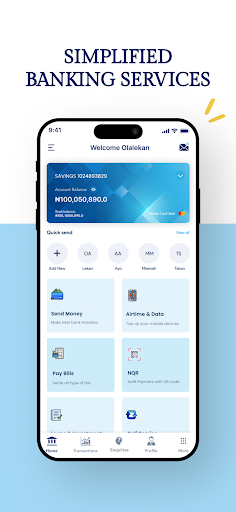
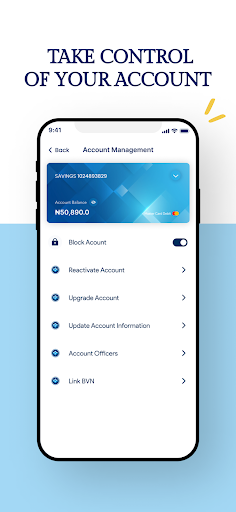
• Single-view of all your account balances and status.
• Access information on all cards linked to your account.
• Block your lost or stolen card.
• Retrieve and share historical transaction receipts.
Send Money:
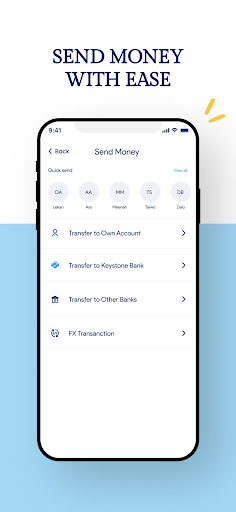
• Transfer funds to your own account.
• Send money to Keystone accounts and all other banks.
• Transfer funds to phone numbers.
• Send money to multiple beneficiaries.
• Seamlessly make transfers to foreign accounts.
Pay Bills:
• Purchase airtime for yourself and others.
• Buy data packages for internet access.
• Settle your cable subscription payments.
• Pay utility bills.
Loan and Investment:
• Request a loan directly through the app.
• Book investment opportunities to grow your wealth.
Self-Service Options:
• Set transaction limits.
• Change and reset your transaction PIN for added security.
• Set up standing instructions for recurring transactions.
• Manage your list of beneficiaries effortlessly.
• Enrol for NQR for enhanced payment convenience.
Contact Us:
For any inquiries, requests, or dispute management, please use the following contact details:
Address: 1, Keystone Bank Crescent, V/I.
Email: Contactcentre@keystonebankng.com
Phone: 014485742 or 0700 2000 3000 or 070 4600 4000.