QTS Mobile
com.qts.mobile.portal
View detailed information for QTS Mobile — ratings, download counts, screenshots, pricing and developer details. See integrated SDKs and related technical data.
- No items.

Screenshots
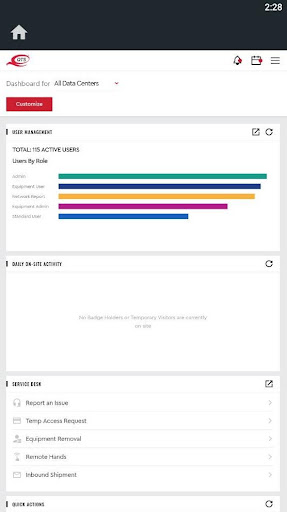


Description
QTS Mobile provides access to our suite of real-time apps that make it easy to manage and optimize your QTS data center environment on-demand.
With QTS Mobile, QTS customers can:
• Manage all Service Desk incidents and tickets
• Manage physical access and badging processes
• View real-time power draw metrics
• Interact with a dynamic dashboard
• Order cross connects and Switchboard interconnection services
• View Sustainability metrics
• View and export badge activity and data center compliance reports
More
Get real-time insight into your QTS data center environment on-demand. With QTS Mobile, customers have access to 100% of the QTS Service Delivery Platform.
Service Desk
o Manage ServiceNow tickets and incidents from initiation to resolution
o Request Remote Hands support
o Request or remove or receive equipment at the data center
o Request Temporary Visitor access
User Management
o Create/Edit/Disable users with roles and permissions
o Request and disable badges on-demand
o View who is on site at any moment in time
o View and export Badge Activity reports
o View and export QTS data center compliance reports
Power Analytics
o Calculates and displays average power demand versus contracted power
o View power draw by suite, cage, rack/cabinet, circuits and poles
o Identifies overused assets and enclosures
o Real-time trended graphs show fluctuations with date and time stamp
o Shows nested hierarchical information for UPS’ and PDUs for customers with dedicated devices
o Generate and export reports on-demand
o Opt-in for automated power overage notifications
Online Ordering
o Order, contract and provision in one paperless transaction
o Cross connects to a cage or an in-house carrier
o Switchboard Interconnection Services include:
• 1 and 10 GB ports
• Virtual Connections to AWS, Azure and Google Cloud Platform
• Virtual Connections between 11 QTS Data Centers
• Virtual Connections to local carrier hotels
o Remote Hands Monthly Subscriptions
Dashboard
Dashboard displays a real-time snapshot of key deployment metrics and operational information with drill down capabilities:
o View Power Consumption vs Power Contracted
o View who’s on site at any point in time
o View enclosures and circuit pairs reaching power draw thresholds
o Manage open service desk issues
o Activate Switchboard ports
o View status of online orders
o See Sustainability metrics
o Access compliance reports
o Access API resources
Getting started is easy – sign in with your QTS Customer Platform user name and password. If you’re an existing customer and do not have an account, please contact our Customer Support team at 866.239.5000.
SDP is available to all QTS customers and accessible via QTS Mobile, web, or API.
QTS continues to innovate. Tell us what features you need and how you would use them via the Feedback link in the app’s menu. We are listening!