PrinterCo
com.printerco.app
View detailed information for PrinterCo — ratings, download counts, screenshots, pricing and developer details. See integrated SDKs and related technical data.
Screenshots

Description
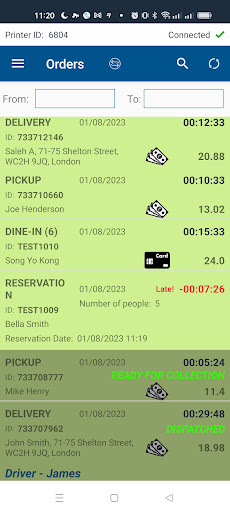
PrinterCo is a software technology company based in the UK, trading globally. PrinterCo app is specially designed for printing online orders from a website or e-commerce store to a POS thermal printer. It works with woocommerce, Shopify, Gloriafood,wp-pizza and open cart etc. Using our API you can integrate our app into any custom-developed website.
Compatible POS: Sunmi V2, Sunmi V2pro, Sunmi V2s, TPS900, Q2i, Printerco H8
Key Features:
1. Automatically prints online orders to thermal receipt printer.
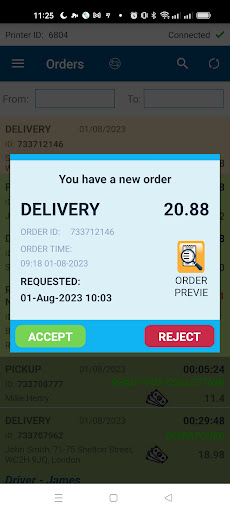
2. Accept or Reject an Order and give instant SMS confirmation to customers.
3. Set a delivery or collection time while accepting an order.
4. Set automated printing at a busy hour or set it as your choice.
5. Preview an order before accepting.
6. Edit items before accepting an order.
7. Add or Remove items from the order before accepting.
8. Order Countdown timer.
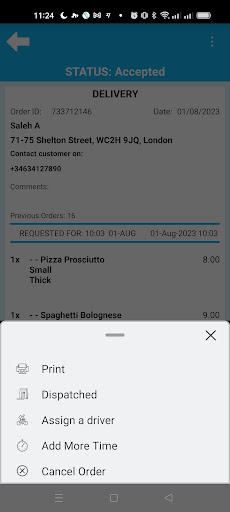
9. Notify Customers via SMS For More Time To Prepare Orders
10. Send confirmation to your customer by SMS and email
11. Assign a driver to perform a delivery task.
12. Send customer detail to the driver via SMS.
13. Accepted orders on a master printer will be sent to the slave printer. Perfect if a kitchen requires a copy of the receipt while the shop-front handles the order.
14. Print End of the day taking and many more.
Web-based printer Management dashboard:
Our intuitive Web-based printer management dashboard gives you full control over your printers. Where we differ from other cloud print solutions is our unique combination to manage your printers. We provide some tools to operate the printers remotely. This becomes very handy for having to make adjustments to the printer settings without getting physical access to the printers.
1. Add unlimited printers to your account and assign each of them to an individual shop or website. It allows you to monitor and make the necessary adjustments for a printer from your dashboard.
2. Customize your receipt format.
3. Upload a logo for each printer to print on the receipt.
4. Set exactly the way you want to print the orders (Automatically when an order arrives or when an order has been accepted by the restaurant)
5. Set different font sizes as per your choice
6. Check which of your printers are connected or disconnected
7. Check all your orders and their status in detail from the Dashboard
8. Troubleshoot with the watchdog and many more.