PrintBrush XDR
com.printdreams.android.printbrushxdr2
View detailed information for PrintBrush XDR — ratings, download counts, screenshots, pricing and developer details. See integrated SDKs and related technical data.
Screenshots


Description
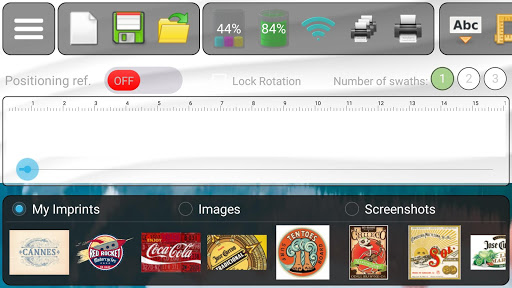
Use this application to connect via WiFi to your PrintBrush XDR mobile printer device. A dashboard will communicate the status of your printer such as ink- and battery levels.
There are sample imprints ready to be used or you can upload, create, save and edit your own imprints.
You can also print portions of screenshots and images taken with your device´s camera.
There is an advance text editor where you can choose font type, size and color.
You can drag objects around the canvas, scale and rotate them. There are also tools for cropping, adding transparency, flip and copy objects.
Utilize the positioning reference to accurately manage where the imprint will be placed.
If the height of the imprint is larger than 15mm, try utilizing the multi-swath feature (up to three swaths).
When ready, then select to print once or multiple times. If multiple times, then the imprint will keep coming out as long as you keep moving the device without lift.
Application can be tested without the device but it is much more fun to test it if you have a PrintBrush XDR.