CleanCall: Caller ID & Block
com.ppcaller
View detailed information for CleanCall: Caller ID & Block — ratings, download counts, screenshots, pricing and developer details. See integrated SDKs and related technical data.

Screenshots


Description
CleanCall help you identify callers and block spam and scam calls with unknown numbers that are common in Vietnam.
Features of CleanCall:
- MAKE CALLS IMMEDIATELY IN THE APP
+ Review call history, including blocked calls
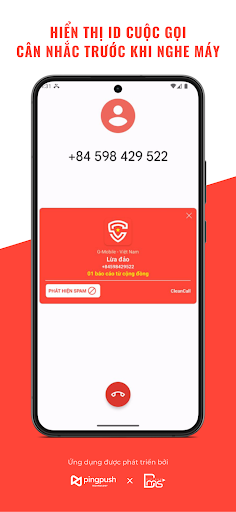
+ Display information and highlight numbers that are identified as spam, fraud...
+ Display incoming caller information, after the call ends, from which the user can decide to call back or reject...
+ Can make outgoing calls directly on the application in functions such as Contacts, Call Log, Keypad...
- HELP YOU TO KNOW ABOUT SPAM, SCAM, and SCAM
+ Automatically identify and display incoming callers outside the contacts list such as spam, credit, fraud... before you answer the phone, helping listeners be more active in whether they want to listen or not.
- BE MORE ACTIVE IN SELECTING AND REPORTING UNWANTED CALLS
+ User can block unwanted numbers directly on the app
+ Actively report spam numbers, scams... quickly
+ Advanced feature automatically rejects spam numbers, scams... with just one touch
CLEANCALL PREMIUM - Upgrade to enjoy the following benefits:
- Know who reported you
- Remove ads
- Expand the list of spam numbers
- Have a premium badge on your profile
- Automatically renews plan ($1.99/month or $3.99/6 months or $5.99/year - price will vary by country)
*USER NEED TO ACTIVATE THE CALL & ID OPTION (Settings > Phone > Call blocking & Identification) FOR CALLS TO RECEIVE CALLS
Privacy terms: https://cleancall.pingpush.vn/privacy-policy
Terms of service: https://cleancall.pingpush.vn/terms
Support:
- Email: contact@pingpush.vn
- Website: https://cleancall.pingpush.vn/