PDF Reader Search Word - Topic
com.pdfreader.pdfreadersearchword
View detailed information for PDF Reader Search Word - Topic — ratings, download counts, screenshots, pricing and developer details. See integrated SDKs and related technical data.

Screenshots



Description
PDF Reader app help you read PDF files and search word or topics easily. The app has a simple interface and a built-in search to find documents fast. It's perfect for professionals or anyone who reads PDF.
The PDF reader app lets you search words inside PDF files quickly, improving work efficiency.
Searching words or topics in PDF files is easy with our PDF app. It saves time and effort, especially with lengthy documents.
The PDF Reader Search Bar helps users find specific information in large PDF documents quickly. It's a valuable tool for efficient navigation and saves time.
Our PDF Reader Search by Name lets you find files on your Android device easily. It's intuitive and saves you from endless scrolling.
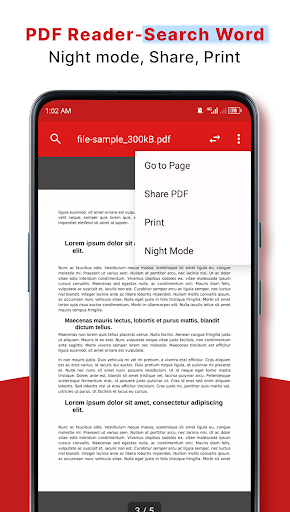
The PDF reader for Android lets you view, print, and share PDF files. It's a powerful app with features like night mode, file renaming, sharing, and printing.
The Handy PDF Viewer offers page-by-page and continuous scrolling, smooth swiping, reflow mode, direct page access, text search, and zoom features for comfortable reading and navigation.
PDF Reader - Viewer Features:
💡Can enable and disable night mode
💡Delete/Rename You can rename files, delete files
🤝Share - Share files with others and collaborate conveniently.
🖨️Print - Print PDF files quickly from your phone.
Handy PDF Viewer
👏Page by page and continuous scrolling mode
👏Swipe smoothly vertical and horizontally
👏Read smoothly with Reflow mode
👏Go to the desired page directly
👏Search for text in PDF and print easily
👏Zoom in and zoom out pages