Time recorder ex(time tracker)
com.ototo.watasiha.timerecorderex
View detailed information for Time recorder ex(time tracker) — ratings, download counts, screenshots, pricing and developer details. See integrated SDKs and related technical data.

Screenshots
Description
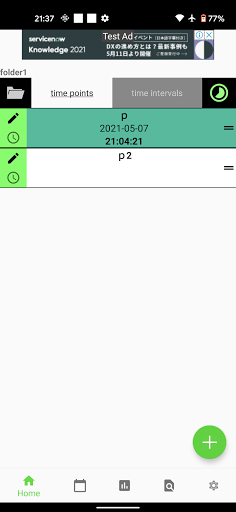
TimeRecorderEx is a simple time tracker that lets you record when and how long you do things with just one tap.
Create your own buttons, tap to log, and check everything later in a calendar view – no complicated setup required.
You can track both time points and time intervals:
Log a single timestamp when something happens (like “start studying”)
Or record from start to end to track how long a task takes
Each activity gets its own record button.
Make buttons for things like studying, workouts, commuting, side projects, chores, or sleep – then just tap the button on the home screen to save the time. No need to type the same thing over and over.
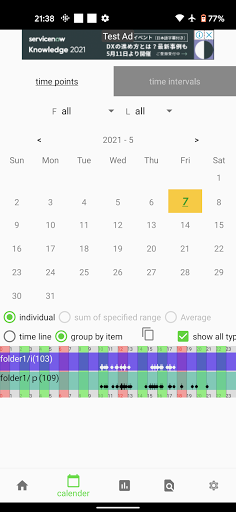
Your records can be viewed on a calendar, so you can quickly see:
What you did on a specific day
How often you did a certain activity
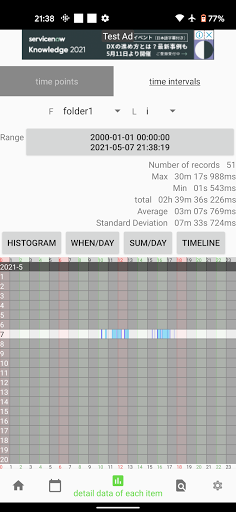
Detailed data for each record when you need it
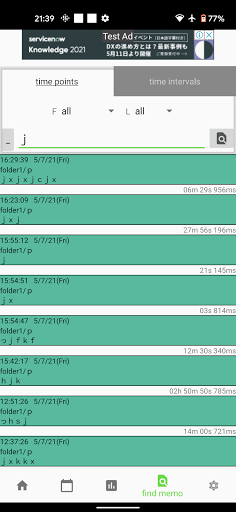
You can also attach memos/notes to each record.
Write a short memo when you log, search later by memo, or filter to show only records that have notes attached. This makes it easier to remember what was actually going on at that time, not just the raw timestamps.
TimeRecorderEx includes backup features so you can protect your data.
You can create backup files from inside the app and load them when needed. There is also a menu for cloud backup, so your time logs can be kept safe even if something happens to your device.
For faster, everyday tracking, there are shortcuts you can use:
Show record buttons in the notification area and log directly from there
Use home screen widgets to start recording without opening the app
Choose whether to show seconds on buttons
Adjust time format and select the time type (timestamp or elapsed time) to match how you like to track
The more you use TimeRecorderEx, the more you can see your real patterns:
which activities you spend time on, which ones you’ve been skipping, and how your days actually look when you put them on a calendar. Making “tap the record button” part of your daily routine helps you avoid gaps and missing logs later.
Start by creating just one or two buttons for the things you care about most, and try logging today.
Download TimeRecorderEx now and start keeping a clear, honest log of how you spend your time.