1C Большая Русская Клавиатура
com.onecwearable.keyboard.ru
View detailed information for 1C Большая Русская Клавиатура — ratings, download counts, screenshots, pricing and developer details. See integrated SDKs and related technical data.
Screenshots


Description
I am 64. My eyesight is not the best, I have fingers on my hands, not matches. I designed this keyboard for myself. If you are under 35, you will need it later, but your parents can definitely come in handy.
Evgeniy Sotnikov, 1C Viarable
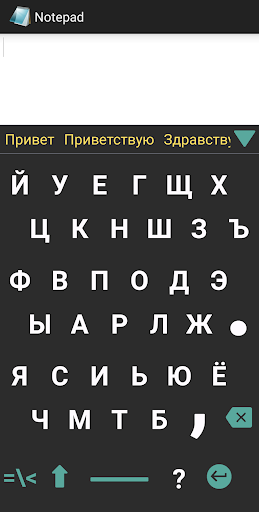
Large letters and symbols of the 1C keyboard protect eyesight, reducing eye strain.
Larger keys are easier to hit - fewer typos.
Getting used to the new layout is quite fast (the keyboard is similar to a compressed standard QWERTY keyboard).
How to install 1C Russian Keyboard?
Download 1C Russian Keyboard from the Play Store, open the application.
Set in the settings "Language and input" 1C Russian Keyboard as the default input method.
Ready! 1C Russian Keyboard will automatically be used in all applications where text input is required.
How to use 1C Russian Keyboard:
1. Touch and hold the "?" key to see all the keyboard features
2. Touch and hold the "L" key to switch to Latin or swipe to switch between Russian and English layouts.
3. Touch and hold the "H" key to open the Keyboard settings.
4. Touch and hold the "C" key to open the Digit input.
5. Touch and hold the "M" key to open the Microphone (voice input).
6. Touch and hold the "K" key to open the Cursor control.
7. Touch and hold Y to Enlarge or Decrease the size of the keyboard.
8. Touch and hold the "E" key to open Emoji (emoticons).
9. Touch and hold the "G" key to open GIFs and stickers.
Write to support@1cwearable.ru We will be glad to any comments!