Touch The Notch
com.notchtouch.appwake.andriod.free
View detailed information for Touch The Notch — ratings, download counts, screenshots, pricing and developer details. See integrated SDKs and related technical data.
Screenshots
Description
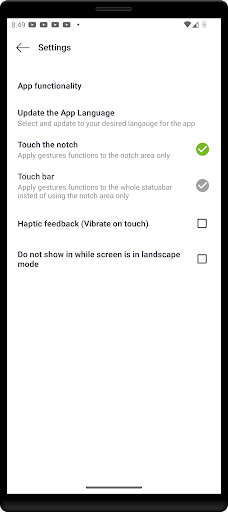
This Touch The Notch is an ultimate tool. It helps you to interact with your device setting with the camera hole. A smart way to convert your camera hole into the shortcut button.
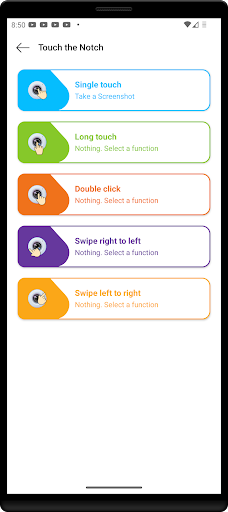
Now it's time to say goodbye to limited interactions with your device's notch! This touch notch will help you to assign various actions and functions to different touch gestures on the notch. With this app, you can easily set the functions and actions on the notch.
You can set the actions for the Single Click, Double Click, Long Press, Swipe Right, and Swipe Left.
⭐ Support change your notch design. You can completely redesign your notch and this is best for those who love to customize their phones.
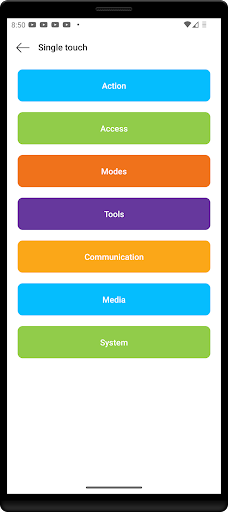
⭐ Interactive camera hole functions are categorized as the following :
💫 Action
- Activate Camera Flashlight
- Take a Screenshot
- Open the power long-press menu
💫 Access
- Camera Activation
- Open Recent App menu
- Open selected app
💫 Modes
- Auto Screen Orientation
- DND - Silence Notifications
💫 Tools
- Scan QR Codes
- Open Websites
💫 Communication
- Quick Dial
💫 Media
- Play/Pause music
- Play next music
- Replay Previous Track
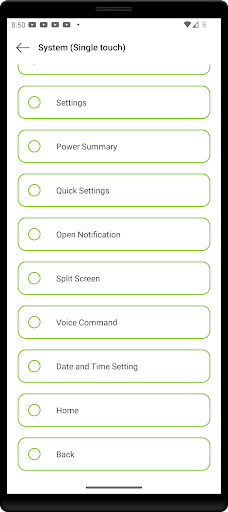
💫 System
- Switch Screen Brightness
- Switch Ringer Mode
- Toggle Ringer Mode
- Power Off Display
- Settings
- Power Summary
- Quick Settings
- Open Notification
- Split Screen
- Voice Command
- Date and Time Setting
- Home
- Back
⭐ Accessibility Service API Disclosure:
This app uses Android Accessibility Service API.
It uses system accessibility privileges of Accessibility Overlay to place an invisible button around and below the front camera cut-out to be functioned as a shortcut for user selected tasks. No data is collected by this service.