NW046(d)한글: Digital watch face
com.ninewatchface.nw046d
View detailed information for NW046(d)한글: Digital watch face — ratings, download counts, screenshots, pricing and developer details. See integrated SDKs and related technical data.
- No items.

Screenshots

Description
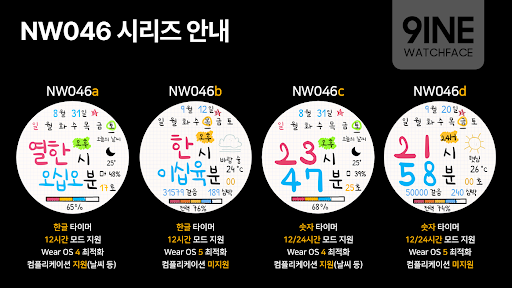
**This watchface is only available on the Galaxy Watch 7 and Ultra that come with Wear OS 5 pre-installed. Users using lower models should use NW046(a) or NW046(c).
[How to install watch face]
1. Install from the companion app
Press the download button on the companion app installed on your smartphone and complete the watch face installation on your watch.
2. Install from the Play Store app
Access the Play Store app > Tap the '▼' button to the right of the price button > Select a watch > Purchase
Press and hold the watch screen to check whether the watch face is installed. If the watch face is not installed after 10 minutes, install it directly from the Play Store web or the watch.
3. Install from Play Store web browser
Access the Play Store web > Tap the price button > Select a watch > Install and purchase
4. Install directly from your watch
Access Play Store > Search for NW053 > Install and purchase
-------------------------------------------------- -------------------------------------------------- -------
[How to connect smartphone battery]
1. Download the smartphone battery app on both your smartphone and watch.
2. Select Phone Battery Level in Complications.
https://play.google.com/store/apps/details?id=com.weartools.phonebattcomp
-------------------------------------------------- -------------------------------------------------- -------
This watch face is only supported in Korean.
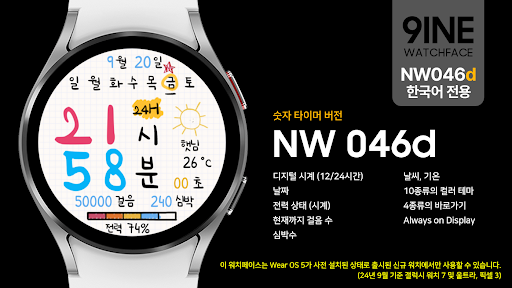
#Information and features provided
Digital clock (12/24 hours)
date
Power status (clock)
Steps so far
heart rate
weather, temperature
10 different color themes
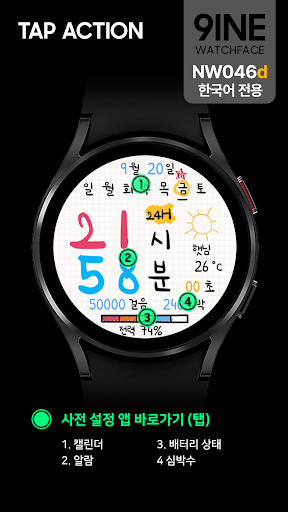
4 types of shortcuts
Always on Display
*This watchface supports Wear OS devices.