Engineering Unit Converter
com.mixeware.engrunits
View detailed information for Engineering Unit Converter — ratings, download counts, screenshots, pricing and developer details. See integrated SDKs and related technical data.
- No items.

Screenshots

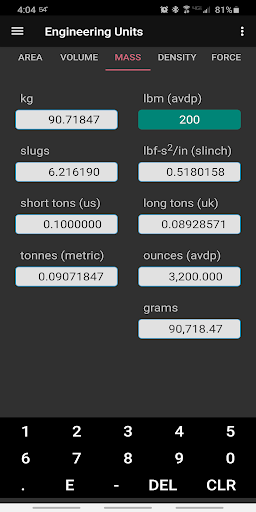

Description
Overview
Engineering Units is a unit conversion app geared toward conversions commonly used in engineering disciplines. The app converts units dynamically – all units on a given page update simultaneously as a number is entered in one of the boxes. Currently, the unit classes are: Length, Area, Volume, Mass, Density, Force, Torque, Pressure, Temperature, Speed, Acceleration, Mass Inertia, Power, and Energy.
Basic Usage
• Select a tab by scrolling horizontally or by selection from the menu button in the upper left.
• Touch a box for the number you want to convert. When touched, all content in the box will be selected so that as soon as you start entering a number it will clear the current contents of the box. Touch the box again if you simply want to modify the current contents. Long press in a box to pop up a Cut/Copy/Paste menu.
• All units on a given tab will update simultaneously and dynamically as a number is being entered into the selected box. An invalid entry in a box (not parsable as a number) will blank all other boxes until a valid number is entered. Entering E for scientific notation will temporarily blank the other boxes until a valid exponent is entered. Touch the screen and scroll up and down on any page or in the menu if some items are off screen.
Support
Send comments, bugs, or suggestions to support@mixeware.com.